MCP Servers
Model Context Protocol (MCP) servers expose tools and resources to AI agents over a standard protocol. CoderFlow lets administrators attach HTTP MCP servers to an environment so that agents running in that environment's tasks can use them.
MCP server snapshots are applied to Claude, Codex, Gemini, and Bob task containers at launch.
Managing MCP Servers
Open Environments -> Overview in the Web UI. The MCP Servers row sits below the Skills row and behaves the same way:
- Click + to add a new server.
- Click a chip to edit.
- Click the × on a chip to remove.

Managing MCP servers requires the environments:mcp-servers permission. See Permissions.
Fields
- Server Name — Unique identifier within the environment. Letters, numbers, hyphens, and underscores only.
workspaceis reserved by Claude Code andcoderflowis reserved for the server-managed entry described below. An entry namedcoderflowthat was saved before the name became reserved keeps working and can still be edited or disabled; it is replaced by the managed entry whenever Task orchestration is on. - Description — Optional short label.
- URL — HTTP or HTTPS endpoint that speaks the Model Context Protocol.
- Headers — Optional request headers sent on every connection. Each header value is either a Literal string or a reference to an environment Secret. See Headers and Secrets below.
- Enabled — Toggle to keep the entry configured but skip it for new tasks.
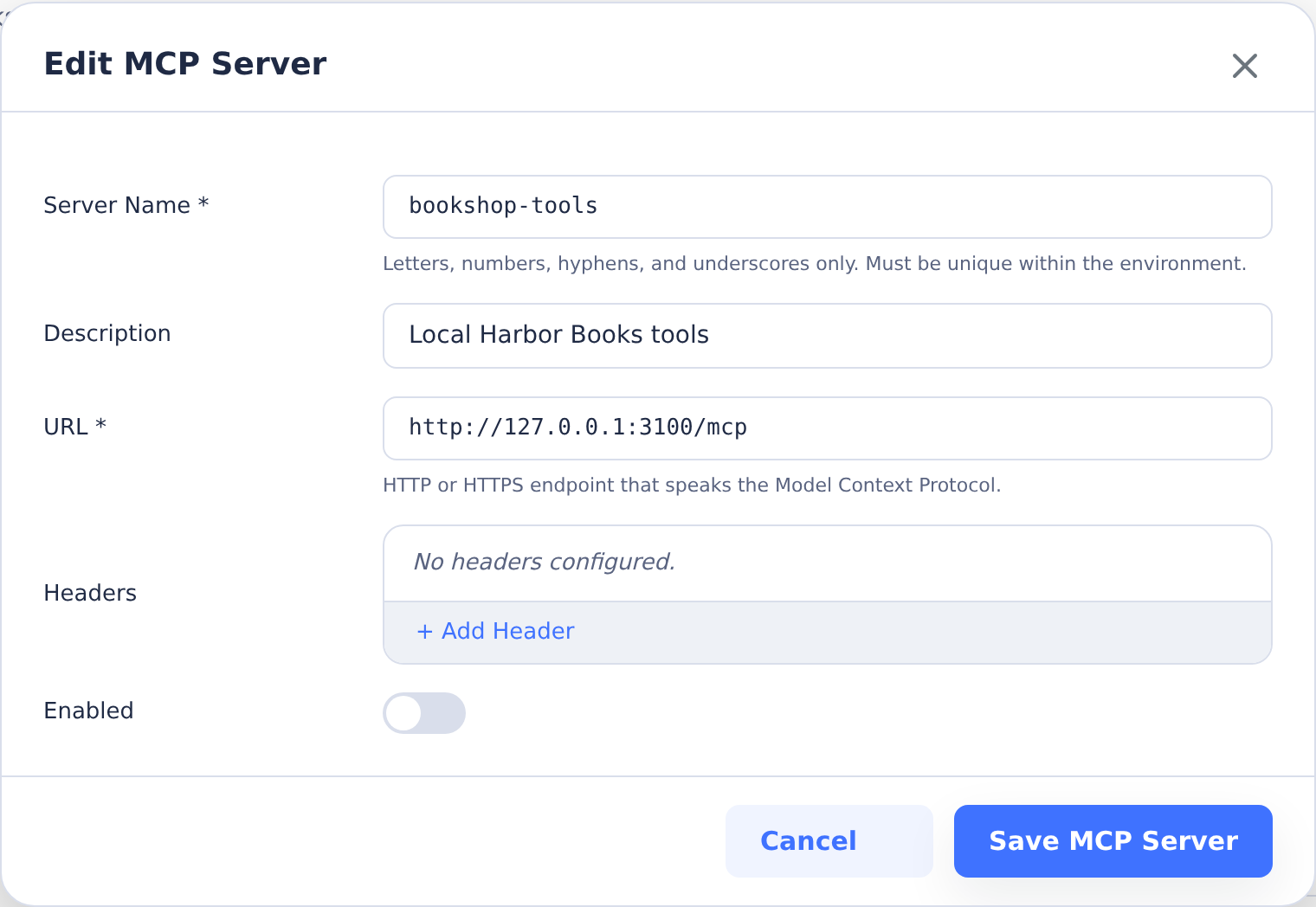
The local endpoint shown is an example address. Use an endpoint reachable from your task containers.
Task Orchestration
Below the MCP Servers row, Task orchestration lets tasks in the environment use CoderFlow's own MCP server to start, follow up, review and inspect other tasks. When it is on, every new task gets a read-only coderflow entry with a task-bound token; no API key or secret is needed. Its settings sit in two groups, each collapsed under a one-line summary of its values.
Child tasks sets who tasks act as and how many they can start:
- Account for tasks without a creator — The account whose permissions apply to tasks without a creator, such as environment-scope automation tasks. Select None to skip CoderFlow MCP for those tasks. Tasks with a creator always act as their creator. Naming anyone other than yourself, or widening the setting (enabling it, allowing deployments or child approval, raising limits) while someone else is the run-as user, requires a server administrator.
- Max nesting depth and Max child tasks per task — Limits on how far and how wide tasks may spawn other tasks. Depth defaults to 3; direct work children default to 10, configurable from 1 to 500. Work tasks, forks and deployments count toward the child limit; judges and reviews retain lineage without consuming slots. Forks of reviewers count as work and retain normal work-task MCP permissions. Judge task tokens cannot create tasks, fork tasks, execute deployments, create more judges, approve tasks or open project pull requests, and work forked beneath reviewers is charged to their nearest non-reviewer ancestor, so additional reviewers do not provide additional work budgets.
- Allow deployments — Whether the deployment tools are exposed to tasks. Off by default.
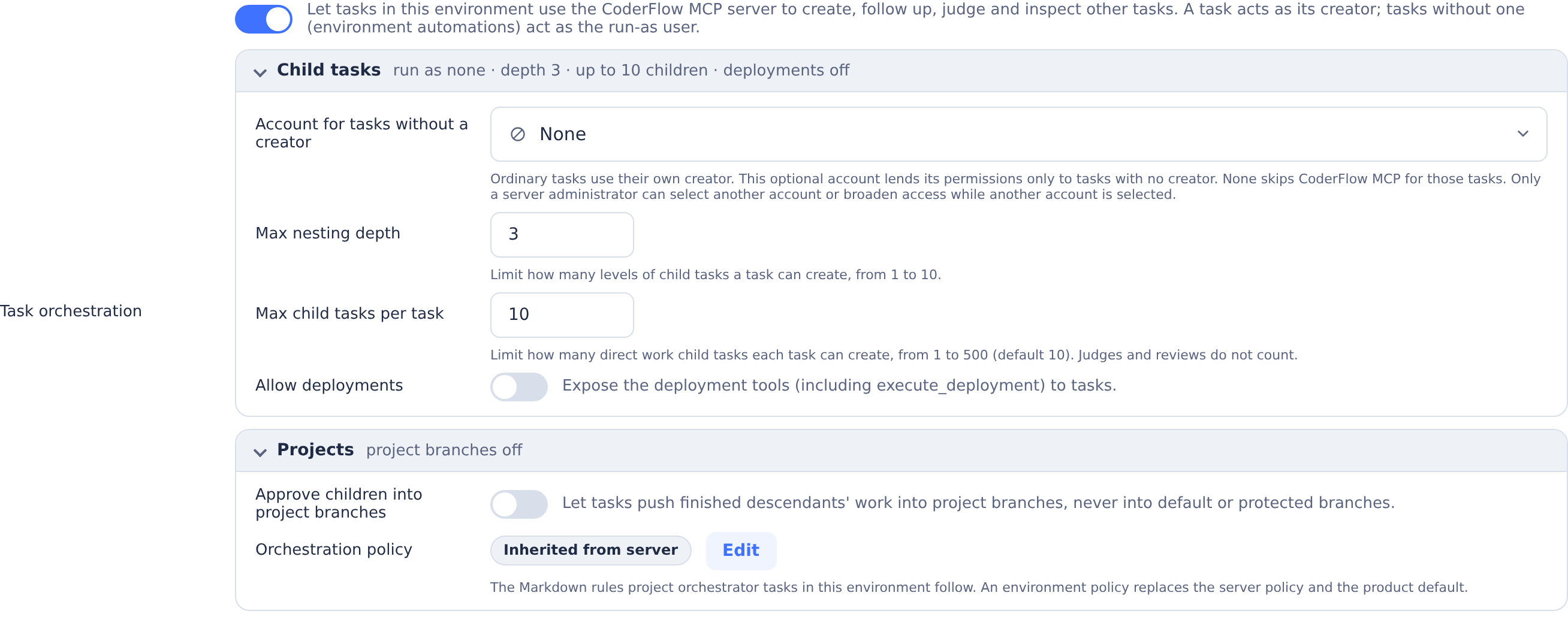
Projects sets how project orchestrators land their work:
-
Approve children into project branches (
allow_child_approval) — Exposeapprove_taskandcreate_pull_requestto task tokens. Off by default. Tasks can commit and push finished descendants only intoproject/branches for human pull-request review. When omitted, the branch is derived from the root task's name and ID, stored on the root and reused across children and repositories.For a new project branch, the server first creates the remote ref at the current tip of the child's launch branch, adding no child content, then verifies the existing branch through GitHub REST before rebasing and pushing. This can be newer than the commit the child originally launched from. Successful repository results include that resolved launch-branch tip as
base_sha. GitHub policy checks require Contents read and Metadata read, with no Administration permission; pushes still require repository write access. Refused creation returnsbranch_creation_failed. If verification or preparation fails, cleanup attempts to delete the created ref only while it still points at that base SHA; a branch that has moved is preserved. Cleanup failures are reported indetails.branch_cleanup.To resolve
approve_conflict, send the child a follow-up to sync onto the actual project branch withgit pull --no-rebase --autostash origin project/..., resolve conflicting changes, and inspect the merge state. If the pull leftMERGE_HEADfor an ordinary project-sync merge, have the child commit that merge resolution first, then restore/stage any remaining autostashed work, rerun tests, and review before retrying normal approval. If committing the resolution consumed all the autostashed work, retry with the clean index; no additional edit is needed. If a fast-forward pull instead leaves an autostash-apply conflict with noMERGE_HEAD, resolve it, rungit add, optionally drop the kept autostash entry after verifying its work is restored, rerun tests, and retry normal approval. The dedicated base-sync flow below must retainMERGE_HEAD. Using merge-based recovery preserves inherited commit identities: rebasing a child that started from or fast-forwarded to newermaincan rewrite main-only commits, causing approval to include those copies. Approval excludes commits already reachable from either the launch branch or the project branch. Unlanded child merge resolutions and any staged work are preserved together in one approval commit when a single replay base excludes all inherited work, even with a clean index. No remaining child work or a prepared tree equal to the project tip returnsno_changes_to_approve, preserving no-op and repeat-approval protection. Divergent inherited histories returnapprove_divergent_history; preserve the original work as a reference, then reapply only the child's own edits and merge resolutions onto the current project tip as staged, uncommitted work before retrying. Use the same recovery if main-only commits were already rewritten by a rebase. If shallow history hides the project merge base, approval keeps the existing launch-branch replay base, with the same check before combining child-owned merges. Preparation runs in a temporary clone; a failed preparation leaves the child's HEAD, index and working tree unchanged.To merge the base into the project branch, use
approve_taskwithsyncBase: true. At each phase end and before opening a PR, fetch both refs and checkgit merge-tree --write-tree origin/<base> origin/<project>. When the base moves in overlapping files, launch a child on the current project tip, fetch the base intoorigin/<base>, rungit merge --no-commit --no-ff origin/<base>, resolve and stage all conflicts, and re-run the combined project tests. LeaveMERGE_HEADpresent and the merge uncommitted for the orchestrator's review. Then approve that child withsyncBase: true(andrepositorieswhen only some repositories are syncing).This mode uses the root project's launch base or the repository branch configured in the root's environment, never the child's default. Missing root repository/base configuration or a different remote for the same repository name is refused. Before committing, the server requires the child's HEAD to equal the remote project tip, a single
MERGE_HEADreachable from the current base tip, and a fully resolved staged tree. History checks use remote-fetched objects in a fresh repository without child alternates; only the reviewed staged tree is imported from the child with object validation. It creates exactly two parents[project tip, MERGE_HEAD]and verifies that this candidate merges cleanly with the fetched base. A reviewed base ancestor is accepted only when that check is clean. Near push, the server rechecks the existing protection policy, refreshes and revalidates a moved base, confirms that the base stayed at the validated tip, and pushes with a lease so a moved project tip is refused.base_sync_conflictrequires a fresh reviewed merge of the latest base and combined tests;base_branch_movedmeans the base changed again during validation. Missing project branches and non-project/targets are refused. A failed preparation or push leaves the child workspace and pending merge intact; success updates the workspace and clears the merge state. The default commit message isMerge <base> into <project branch>. Normal approval suggestssyncBase: trueonly for a pending base merge at the current project tip. Other pending merges returnmerge_resolution_commit_required, directing ordinary project-sync recovery to commit the merge resolution first. See the sync flow and refusal codes for recovery details.Agent approvals (including every replayed child commit and base-sync merge) and default/custom PR bodies strip existing co-author trailers, CoderFlow Learn more lines, and agent-generated footers. Unless the server setting
coderflow_attributionisfalse, they append exactly oneCo-Authored-By: CoderFlow <[email protected]>line followed byLearn more: https://coderflow.ai. Attribution off still removes those existing lines. The Web UI approval dialog is unchanged; its injected fallback also honors the setup setting if/settingsis unavailable.Verified remote/configured defaults and remote/config-protected branches are refused, with strict policy rechecked immediately before pushing. GitHub is supported; unverifiable protection (including Azure DevOps) and any applicable GitHub ruleset refuse approval. The ruleset check remains conservative because the REST
protectedflag covers both classic protection and rulesets, so read-only metadata cannot safely separate them. Unknown rule types also refuse approval. Classic wildcard rules are evaluated by GitHub on the created branch, without GraphQL rule enumeration. Policy checks and pushes are separate: an admin changing a project branch's default/protected status in that interval could evade the check. The prefix limits accidental targeting and remote protection is the backstop, subject to credential bypass rights.For
approve_task, the acting user needstasks:approve(ortasks:approve_anyfor other users' tasks).create_pull_requestopens or reuses PRs from the recorded root project branch into each repository’s launch base, supports draft PRs, and records links on the root. The root or any descendant can call it; the acting user needstasks:approvein the root’s environment for shared roots. Locked roots (shared === false) require the owner withtasks:approveor a user withtasks:approve_any. Each created/reused PR reports per-repositorymergeable,mergeability, andconflicting_files, preferring provider state and otherwise checking remote tips withgit merge-tree. Conflicts include file paths; unavailable checks return unknown or an explicit conflict-list error, never clean. If the provider reports conflicts but Git checks a clean merge, provider state is retained withconflicting_files: nulland an explanation; the clean check’s SHAs are not attached to the conflict report. Refresh both checks before handoff. The isolated Git fallback uses a bounded 300-commit fetch; insufficient history requires a separate check before handoff. Repositories without the recorded project branch are skipped withno_changes: true, without a prompt to push them. An explicit missingbranchoverride instead fails withhead_not_found. Check all results, sync conflicts and rerun combined tests before human handoff. It never pushes or merges. Enabling this while another account is the run-as user requires a server administrator. -
Land projects through — Shown while Approve children into project branches is on. Chooses how project orchestrators land the project branch (
project_landing): Pull requests (pull_requests, the default) or CoderFlow approval (approval), which stages the whole project in the orchestrator's workspace for one approval of the orchestrator task. Each orchestrator launch can choose differently for its project. The tools enforce the choice, so an orchestration policy sets the landing cadence but not the flow:stage_project_landingis offered only to projects that land through approval, andcreate_pull_requestis refused for them unless the project already has a pull request for its project branch. Turning child approval off keeps the stored choice. See Landing and Approval. -
Orchestration policy — The rules orchestrators follow; see Orchestration Policy.
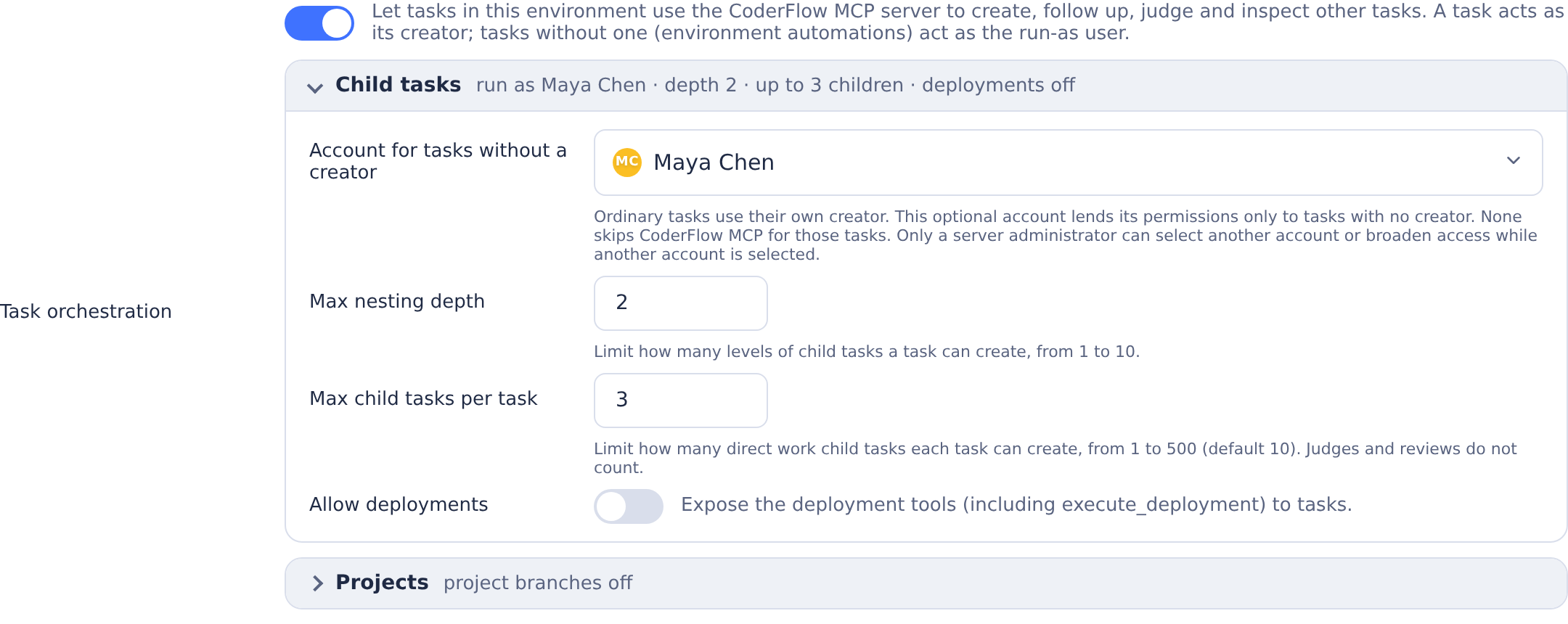
Automatic child-completion wake-ups stop after 200 consecutive automatic turns; a non-automatic turn resets the count.
The setting is stored as coderflow_mcp on environment.json and needs the global MCP server to be enabled under Settings → Integrations → MCP Server.
Orchestration Policy
In CoderFlow Full, the Orchestration policy row at the end of the environment's Task orchestration → Projects group controls how project orchestrator tasks plan, delegate, review, and land work. The group and policy row are hidden while Task orchestration is off. Seeing the Task orchestration settings requires environments:mcp-servers. The policy is a Markdown document. The agent follows it; the Task orchestration fields above continue to enforce task limits, tool access and how projects land.
CoderFlow selects one complete policy, in this order:
| Priority | Level | Location |
|---|---|---|
| 1 | Environment | environments/<env>/ORCHESTRATION.md in the setup repository |
| 2 | Server | ORCHESTRATION.md at the setup repository root |
| 3 | Product default | Supplied with CoderFlow |
The nearest override replaces the entire document. Nothing is merged. An absent override inherits the next level; an existing whitespace-only file also inherits. Copying an environment carries its environment policy with it. If it has no override, the copy inherits the server policy or product default.
Default Policy and Customization
The product default covers the project plan and ledger, child naming and ownership, agent selection, reviews, acceptance checks, landing, escalation, and completion criteria. It directs children to leave changes uncommitted, uses the environment's default child agent unless the user specifies one, and asks for two different reviewer providers when available. Its review-loop defaults are three rounds, medium-or-higher feedback, and pulling the latest changes before feedback and ordinary follow-ups. It prefers project-branch approval with a human PR review per phase, falling back to integration in the orchestrator when child approval is unavailable.
Customization starts from a copy of the effective policy: the product default, or the server policy if the environment inherits one. Keep every rule you want in your saved document, because saving an override does not retain rules from another level. Later changes to a lower level do not flow into an existing override.
Environment Editor
The Orchestration policy row shows the current state:
| State | Meaning |
|---|---|
| Product default | Neither the environment nor the server supplies an override. |
| Inherited from server | The environment has no override and uses the server policy. |
| Customized | The environment supplies its own policy. |
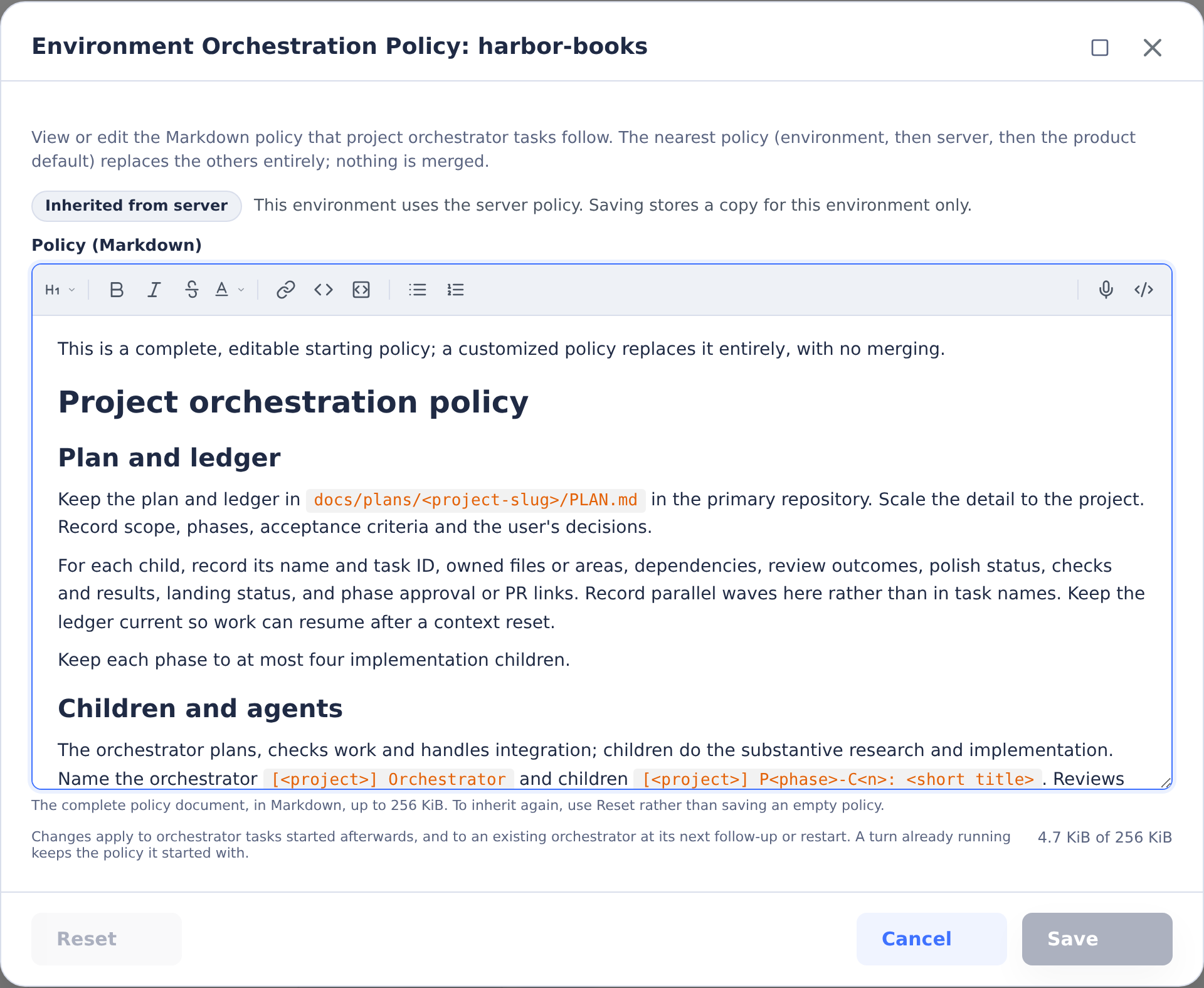
Choose Edit to open the dialog. Policy (Markdown) shows the policy formatted as you edit it; the source toggle at the right end of the editor's toolbar switches to the Markdown source and back. Then choose Save. Save becomes available after you change the document. Use Reset to delete the environment override and inherit the server policy, or the product default when no server override exists. Reset is disabled unless this level is customized, and its confirmation names the fallback policy. Saving empty text is rejected; use Reset to inherit. Policies may contain up to 256 KiB of UTF-8 text.
Reading the environment policy requires environments:view_details. Saving or resetting it requires environments:instructions, the same permission used for environment instructions. Without that edit permission, the row's button is View and opens a read-only preview with Close; editing controls, Save, and Reset are hidden. The row also requires the Task orchestration settings permission described above. See Permissions.
Server Editor
In server Settings, find the Orchestration policy card immediately after the MCP Server card. It shows Product default or Customized. Edit opens the same Markdown policy dialog; Save writes the server override. Reset deletes it and restores the product default for environments without their own override, after confirmation. Reset is disabled while the server uses the product default.
Reading the server policy requires settings:view; saving or resetting it requires settings:manage. Users who may view but not manage settings get View and a read-only preview. Both policy editors require Full edition. See also server MCP settings.

Editing from a Task and Applying Changes
The Environment Instructions (environment-instructions) skill can read, replace, or reset the current environment's policy through its management API. It uses the task owner's environments:instructions permission and requires Full edition. Ask it to update the environment's orchestration policy; editing a task's local policy copy does not change the stored override.
Saved changes apply to orchestrator tasks started afterwards. An existing orchestrator also refreshes its effective policy when a follow-up starts or its container restarts or is re-created; a policy edit does not replace the instructions of a turn already running. Only tasks with the orchestrator role receive the product orchestration skill and effective policy.
Headers and Secrets
Headers commonly carry credentials, like Authorization: Bearer …. To avoid storing credentials alongside environment configuration:
- Define the credential as a secret on the environment with Tasks in Available For.
- In the MCP server modal, add a header row, switch its value mode to Secret, enter any literal prefix or suffix required by the header, and select the secret from the dropdown. For example, put
Bearerin the prefix field for anAuthorizationheader when the secret value is only the token.
The credential is resolved to its current value when each task container is created, and a user-scoped secret can override the environment secret for that user's tasks—matching how secret-backed environment variables work.
Only value-type secrets with Tasks availability are eligible for header references. File-type and build-only secrets are filtered out of the dropdown and rejected by validation.
Lifecycle
Each task's MCP server set is captured when the task's container is created:
- Updates to an MCP server's URL, headers, or referenced secret values take effect for new tasks. Tasks that are already running, or that are restarted from a stopped state, continue to use the configuration they were launched with.
- Disabling an entry removes it from new tasks. Already-running tasks are unaffected.
- Deleting an entry behaves the same as disabling it.