IBM i Task Libraries
When an environment has an IBM i connection with the Build feature enabled, CoderFlow creates a temporary IBM i library for each task. This task library is the build target for codermake — it gives every task a fully isolated namespace on the IBM i system so concurrent tasks can compile against the same source without colliding, and so experimental work stays out of shared production libraries.
This page covers how task libraries are named, how they're cleaned up, and what to do when one is left behind.
What's in a Task Library
The task library is a real IBM i library (DB2 schema) on the connected system, owned by the IBM i user profile configured on the connection. While the task is running, agents use codermake inside the container to compile RPG, COBOL, CL, DDS, and SQL source into native IBM i objects, all written into the task library. The library appears in the user's library list ahead of any production libraries, so calls to programs that exist in both paths resolve to the task copy first.
The task library is intended for build artifacts only. Long-lived target libraries — production code, sync targets used by Sync to IBM i, or htdocs deploy directories — are configured separately on the connection and are not part of this lifecycle.
Naming
Library names are generated as:
<prefix>_<24-character-uuid>
For example, AITSK_92AB1F4D8E60C7A2B5031F7E. The prefix comes from the Build Library Name Prefix field on the IBM i connection (1–5 characters, first character A–Z, @, #, or $; remaining characters letters, digits, @, #, $, _, or .). The 24-character suffix is derived from a fresh UUID with the version and variant nibbles removed, then uppercased.
When the library is created, its description is set to:
CoderFlow task <task-id>
This is how you trace a library back to its task in tools like WRKLIB or DSPOBJD — the task ID matches the ID shown in the CoderFlow UI and in the task's URL.
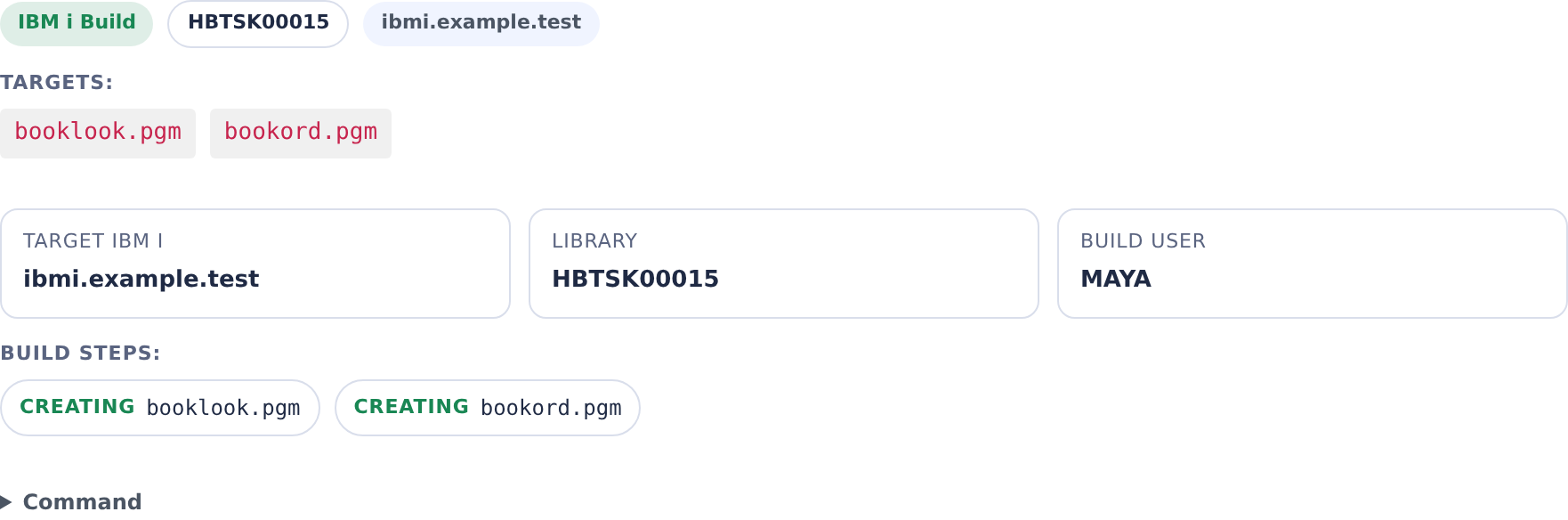
In Agent Activity, select IBM i and expand an IBM i Build entry to see its target library. Use that system library name when inspecting the compiled objects.
Lifecycle
A task library belongs to the task's container, not to one run of it. It is created once, the first time the container starts, survives the container being stopped and started again, and is dropped by the CoderFlow server after the container is removed. The container registers the library with the server when it creates it, so the drop no longer depends on anything running inside the container.
| Event | What Happens |
|---|---|
| Container first starts | The entrypoint registers the library with the server, then runs CREATE SCHEMA <library> over SSH, resolves the system library name from QSYS2.SYSSCHEMAS, tags the library with the task description, and exports IBMI_BUILD_LIBRARY and IBMI_BUILD_SCHEMA into the container's shell environment, along with CODERMAKE_LIBRARY_LIST when the task uses a build library list. codermake then marks the targets in the connection's Build Repo / Build Directory as built, except those whose source differs from the task's baseline. |
| Task runs | The agent compiles into the library by invoking codermake. Compiled *PGM, *SRVPGM, *FILE, and *MODULE objects all land here. |
| Agent turn or test session starts | With Clean Up Task Libraries on for the container, a best-effort clean-up removes objects the task's source no longer builds from the library. See Objects the source no longer builds. |
| Container is stopped, then started again | Nothing happens to the library while the container is stopped. On the next start the entrypoint finds its registration and reuses the same library, with every object already built into it, and exports the same variables. No new library is created and nothing is marked as built again. |
| Container is removed | The server runs DROP SCHEMA <library> CASCADE on the IBM i over the connection, with a timeout of 180 seconds per attempt. On success the library and all of its objects are removed from the IBM i system. |
Because the library is dropped only after the container is removed, a task library lasts as long as its container. Stopping a container, including the automatic stop after a period of inactivity, keeps the library. The container is removed when its task is deleted, rejected, approved and pushed, or marked as a loser, when its stopped-container retention expires, or when an administrator removes it. See Container Lifecycle for when each of these happens. The drop usually starts as soon as the container is removed, and at the latest when the server's cleanup sweep, which runs every 10 minutes, notices that the container is gone. The sweep also covers a container removed outside CoderFlow, for example with docker rm.
This applies to containers created by this version of CoderFlow or later. A container created by an earlier version keeps the behaviour it was created with until it is removed.
When a drop fails
A failed drop is retried, but not indefinitely:
- Each failure is retried after a growing wait. After the n-th failed attempt the server waits min(5 minutes × 2n−1, 6 hours) before trying again: 5 minutes, then 10, 20, 40 and so on, never more than 6 hours. Retries run on the server's 10-minute sweep, so a retry can come a little later than its wait. A timeout, a network error, an IBM i that is down, and an object lock all count as failed attempts.
- The number of attempts is limited. After
CODERFLOW_EXTERNAL_RESOURCE_MAX_ATTEMPTSfailed attempts (default 10; an integer from 1 to 1000), the library is marked orphaned. With the defaults the attempts span about a day. - A drop that cannot run at all is not retried. It is orphaned on its first attempt. This happens when the environment or the connection has been deleted, when the connection is no longer available to Tasks, or when its SSH key has been removed.
- An orphaned library is not tried again on its own. The server logs one error naming it, and the library has to be dropped by hand, or retried once the cause is fixed. See Orphaned Libraries.
Set CODERFLOW_EXTERNAL_RESOURCE_MAX_ATTEMPTS in the server's environment before starting it, for example CODERFLOW_EXTERNAL_RESOURCE_MAX_ATTEMPTS=20 coder-server start. An invalid value is logged as a warning and the default is used.
A library deleted while its container exists
CoderFlow does not check that the library still exists when a restarted container reuses it. If the library is deleted on the IBM i while its container still exists, for example by hand, the container keeps using the name of a library that is gone, and its next build fails with an IBM i error saying the library is not found. Don't drop a task library by hand while its container exists; the server drops it when the container is removed.
What a new library builds
A new task library is empty. Programs and files that aren't rebuilt into it are found in the libraries below it on the library list. When the library is created, every build target is marked as already built, except the ones whose source differs from a baseline commit. Those build into the task library the next time the agent runs codermake.
| Task | Baseline |
|---|---|
A child on a project/ branch, or a reviewer of one, given a project build (with Build Children and Reviewers Over It on) | The project build's commit, when the checkout has it and deleted nothing since. The build's library goes next on the library list, ahead of the normal libraries, so the child's first build compiles only what changed since the build. A reviewer always gets the build on its list; its own checkout is marked from the build's commit under the same conditions, and it builds review checkouts over the build with coderflow-ibmi-layer. A later library that isn't over the build (a restart that has to create one after files were deleted since the build) is marked from the rows below instead. The task log names the project build. Otherwise the task falls back to the rows below. |
On a project/ branch, such as a child of a project orchestrator | The commit the project branch started from on the build repository's configured branch. The child's first build compiles the project's accepted work as well as its own changes, so its tests don't run older copies from the libraries below. If the start can't be found, the configured branch's tip is used, and the task log says so. |
| Any other task | The commit the task started from. Only changes already in the checkout at start, such as a fork's copied changes, are built. |
The baseline is chosen, and the targets are marked, only when the library is created at the container's first start. A stopped task that restarts keeps its library and the objects already built into it, and nothing is marked again: its next build compiles what has changed since its last build, including anything a pull brought in at the restart.
- Needs codermake 4.4.0 or later, whose SQL check stops a script from creating its object outside the task library. With an older codermake, every target is marked as built and only sources changed later are built. To install a newer codermake, rebuild the base image and dependent environment images.
- A change to a
Rules.mkalone doesn't rebuild anything. A deleted source can't remove an object from the libraries below, either; the clean-up, when it is on, removes it from the task library only. - Rebuilt physical files and SQL tables are empty. If a project's accepted work changed one, each child's library gets a new, empty copy of it. Programs that find files through the library list can then open that copy instead of the shared data.
- The task log names the baseline and how many files differ from it. The task output also records it in
.ibmi-build-baseline.json, with the library name and codermake version.
Objects the source no longer builds
When a task deletes a program's rule and source, codermake doesn't delete the program it built, so the program can still be called from the task library. The clean-up step deletes it. It is off by default: turn on Clean Up Task Libraries on the Build connection. The setting is read when a task's container is created, so it applies to containers created after it is turned on, and a container keeps the setting it was created with until it is removed. While it is off, task libraries behave as described above, and nothing below happens.
When it is on, a clean-up runs before each agent turn, and when a person starts a session on the task's test link (Genie's start page and its session initialization, Rich Display's start programs, or a configured launch URL) while the task's container is running and its agent isn't. It compares the build markers codermake keeps in the build directory with the targets the current source builds. Each object that nothing builds any more is deleted from the task library, with DLTPGM, DLTSRVPGM, DLTMOD, DLTF and the like. An object that isn't in the library counts as deleted, and files built over others are deleted first. The task log lists what was removed.
If one can't be deleted, for example because an IBM i job holds a lock on it, or is of a type CoderFlow doesn't delete, the task moves to a new task library: it is registered and created as at the container's first start, and its targets are marked from the same baseline. The task's changes are then rebuilt into it at once, so it holds what the old one did. The task log says so, and the agent's shell, the test link and Task Details follow the new library. The old library is no longer used, but it stays registered and is dropped with the container, since a job may still have it.
- The clean-up is best effort. A clean-up that fails or can't run is logged in the task log, and sessions still start on the task's current library. That includes an IBM i that can't be reached,
codermakethat can't list the targets, a stopped container, an agent that is running, and a clean-up skipped within the minute. Sessions are refused only on a library that isn't rebuilt yet, on one being replaced or replaced, and while known leftovers remain (below). - Sessions are refused while known leftovers remain. From the moment a clean-up finds objects the source no longer builds until none is left in the library (or the task has moved away from it), test-link sessions on it are refused with an explanation, including after a server restart (
.ibmi-build-library-cleanup-pendingin the task output). That covers a clean-up still running, an IBM i that stopped answering part-way, and a move that couldn't be made. The next clean-up, before an agent turn or a session start, tries again. - A new library that isn't rebuilt yet refuses sessions. It is recorded as not built (
.ibmi-build-library-unbuiltin the task output) before it becomes the task's library. While that record names the task's library, every test-link session is refused with an explanation, rather than started on the older copies in the libraries below, including after a server restart. The record stays through a compile that fails, runs long or is cut off, and goes once a clean-up finds nothing left to build: build the changes withcodermake, or ask the agent to, then start the session again. - Only the task's current library starts a session. With the step on, Genie's own session initialization is checked too: a page loaded for another library (the old one, from the moment the move starts, or one an earlier container of the task had) is refused, and has to be reloaded. A session start is also refused, with a request to try again, while a clean-up is still running after the session's wait.
- A move cut off part-way is put right the next time the container starts or the clean-up runs. Until the new library is the task's library, the move is undone: the half-made library is released for the server to drop, the old library's markers come back, and the next clean-up tries again. After that, the move is finished.
- It never runs while the agent is running, nor before a session while the container is stopped, and at most once a minute before test sessions, unless a new library waits for its rebuild. Setup and clean-ups run one at a time in the container, so a clean-up that outlasts a session's wait isn't disturbed by the next one.
- It only touches the task's own library: the one the task's record names, with the connection's build library prefix, and registered to the task's container. Anything else is left alone, and the task log says why. With the step on, a container that can't register its library creates none, rather than one nothing would drop (see the warning below).
- Each step on the IBM i is time-limited: a delete or library creation that hasn't answered in 5 minutes, or a rebuild after an hour, is given up. Nothing is deleted on its account, a new library whose creation was given up is dropped with the container, and a rebuild that was given up leaves the library refused until it is built.
- The libraries below aren't touched. A program the task deleted that the normal libraries still hold can still be called from there.
- Over a project build, the clean-up removes objects from the task's own library only, never from the project build's. A new library it moves the task to keeps the project build next on its list, and is marked from the same baseline.
- Needs codermake 4.4.0 or later, as baseline marking does. If the IBM i can't be reached, nothing is deleted and the task log says so.
Orphaned Libraries
Orphaned libraries are a server concern. The CoderFlow server, not the container, drops a task library, so a container that crashes, is killed, or is stopped abruptly no longer leaves its library behind: the server drops it once the container is removed. A library is orphaned only when the server gives up on dropping it:
- Every attempt failed. The drop failed on each of its
CODERFLOW_EXTERNAL_RESOURCE_MAX_ATTEMPTSattempts (10 by default, spanning about a day; see When a drop fails). The usual cause is an object lock: an active job on the IBM i system, such as a debugger session, a running RPG program, or an open DB2 cursor, holds a lock on an object in the library, andDROP SCHEMA <library> CASCADEfails while the lock is held. An IBM i system that is unreachable for the whole period has the same effect. - The drop cannot run at all. The environment or the connection has been deleted, the connection is no longer available to Tasks, or its SSH key has been removed. The library is orphaned on its first attempt, without retries.
For each orphaned library the server logs one error and does not try again. The message is External resource orphaned: deletion failed on every attempt or External resource orphaned: its deletion cannot succeed, and its context names the library: the kind (ibmi-build-library), the description (CoderFlow build library for task <task-id>), the owner (coder-<task-id>), the environment, the attributes (schema and library), and the last error. Look for these errors under Server Administration → Logs, filtered to Error (see Server Logs), then drop the library by hand as described in Manual Cleanup.
Orphaned libraries are also listed, under Orphaned, on the environment's External Resources tab for anyone with environments:manage there, and in Server Administration → External Resources for Server Admins. From either, Retry runs the drop again once the lock is cleared, and Forget stops tracking a library you dropped by hand. See Seeing what is stuck.
A library can also be left behind without the server ever knowing about it. If the task log shows WARNING: The IBM i build library is not registered with CoderFlow, the container could not register its library: each start of that container creates a new library, and none of them is dropped when the container is removed. Drop them by hand once the container is removed.
Identifying Orphaned Libraries
The server's error names an orphaned library directly: its library attribute is the system library name. To look for leftovers on the IBM i system itself, use the description: every task library carries the task ID in it. List libraries that match your prefix and look at the description text:
WRKLIB LIB(<prefix>*)
Or, from QShell:
db2 "SELECT SCHEMA_NAME, SYSTEM_SCHEMA_NAME FROM QSYS2.SYSSCHEMAS WHERE SCHEMA_NAME LIKE '<prefix>\_%' ESCAPE '\\'"
Then cross-reference the task IDs with the CoderFlow task list (or task URLs). A library whose task's container has been removed is a cleanup candidate. A library whose container is only stopped is still in use: the container reuses it when it starts again, and the server drops it when the container is removed.
Manual Cleanup
Once you've confirmed no IBM i job is holding objects in the library, delete it with:
DLTLIB LIB(<library-name>)
DLTLIB honors the same locks that broke the original DROP SCHEMA — if the library has active locks, the command fails with CPF210B or similar. End the locking job (ENDJOB) or wait for it to finish, then retry. Avoid DLTLIB OPTION(*IGNORE) unless you've confirmed nothing critical is using the locked object.
For a backlog of orphans, end any related jobs first (WRKACTJOB to find them), then run DLTLIB in a loop or a CL program. There is no CoderFlow-side bulk cleanup UI today.
You don't have to wait for the server to give up before you clear a lock or delete a library whose container has been removed. If the server is still retrying the drop, its next attempt finds the library gone and records it as dropped.
What's Not in a Task Library
Some IBM i objects related to a task live outside the task library:
- Source members written by Sync to IBM i — these go to a target library you choose at sync time, not the build library. The target library persists across tasks.
- Profound UI htdocs files deployed by the Profound UI htdocs Files feature — these go to the IFS path configured on the connection, not the task library.
objx/objxsrcanalyzer libraries used by Import IBM i Sources and Generate IBM i Build Rules — these are a single shared utility library (defaultPLOBJX) installed on first use and reused across sessions.
None of these are subject to the task library lifecycle. They have their own creation and cleanup rules.
Configuration Reference
| Setting | Where | Notes |
|---|---|---|
| Build Library Name Prefix | IBM i connection (Build feature) | 1–5 characters; required when Build is in scope tasks. Determines the library's prefix. |
| Build Repo | IBM i connection (Build feature) | Which environment repository codermake runs in. Required. |
| Build Directory | IBM i connection (Build feature) | Optional subdirectory inside the build repo. The container cds here before running codermake. |
| Library Lists | IBM i connection (Build feature) | Optional named library lists for compiles, one of which can be the default. See Build library lists. |
The generated schema name is longer than IBM i's 10-character system library name. CoderFlow resolves the system name through SYSTEM_SCHEMA_NAME; use that name when inspecting the library with IBM i tools.