MCP Server
CoderFlow can act as a Model Context Protocol (MCP) server. Once an administrator enables it, any MCP-capable agent — Claude Code, Claude Desktop / Cowork, GitHub Copilot in VS Code, Cursor, and others — can hand work to CoderFlow directly instead of a user copying and pasting between tools.
Through the MCP server an external agent can:
- Discover the environments and task templates the user can use
- Create a task, optionally passing along a handoff (summary and transcript) of the session it is coming from
- Run the same task with several agents side by side as one task group, the way the Web UI's multi-agent launcher does
- Attach files for the CoderFlow agent to read
- Poll a task's status and read the agent's latest response (or, on request, its summary with an indication of how far behind the conversation it is)
- Browse work by task group: see multi-agent submissions and their judge runs as one rolled-up unit, then drill into the individual tasks
- Launch a judge or review run on a finished group, with the judge run by any agent (often a different provider than the one that wrote the code), the same way the Web UI's AI Review / Judge does
- Read a finished task's output: judge and review recommendations (verdict, confidence, per-variant improvements), the visible agent responses across turns, failure diagnostics, and any file under
/task-output - Send follow-up instructions to a finished task
- Rename tasks and task groups so they are identifiable on the dashboard
- Pin and unpin tasks and task groups, including unpinning several finished groups in one call
- Discover an environment's deployment profiles, read a profile's parameter schema, start a deployment, and follow it like any other task
- Stop or interrupt a task, control its app server, build an environment image, run a named test, run an automation, check a connection's readiness, or run an environment deployment (see Task runtime, builds, tests and environment operations)
- Read license status, documentation publication, interactive containers, QA destinations and your own notification preferences (see Status, publication and session reads)
- Summarize a task's changes for review before approving it, and read long diffs hunk by hunk (see Task review and approval)
- Read the setup repository's pending changes and publish selected files (see Setup repository publication)
Every connection authenticates with a user's personal API key and runs under that user's roles and permissions. The MCP server never grants access beyond what the same user has in the Web UI or CLI.
In Full edition, the in-app assistant, Ask CoderFlow, uses these tools for the signed-in user. Read-only tools work even with Allow Actions off. Changes need Allow Actions on, and each one waits for the user to confirm it, unless the user lets the conversation apply renames, pins, snoozes or task starts automatically within a limit the administrator sets. Deployments are available there as changes that always need confirmation: deploy tasks (execute_deployment) and environment deployments (run_environment_deployment, cancel_environment_deployment). These settings are independent of the MCP Server toggle below. Ask makes only the changes users make commonly: some writes this page describes, such as uncommon environment changes, media publication and shared skill file publication, are read-only in Ask, which explains them and points the user to the page where they are made (see Maintaining an environment). External MCP clients keep them. In Ask, a confirmed change is also checked again right before each thing it changes, and stops if Ask CoderFlow, Allow Actions, the license, the edition or the user's permission was lost (see Permissions and safety); calls from external MCP clients are not affected.
Some changes are confirmed actions in Ask CoderFlow only. They are not registered on /mcp and are withheld from task tokens, because each needs the user's Confirm on a card: running or cancelling a workspace command in an interactive container (Status, publication and session reads), editing or removing a queued follow-up (Reading task panels), launching or deleting a saved objective (Ask CoderFlow), approving, rejecting and opening pull requests (Task review and approval), and changing your own notification preferences (Status, publication and session reads).
Every read-only tool's response, including "not found" answers and refusals, is checked again just before it is sent, also within a batch. If access changes while a read is in progress, the server reads again with the caller's current access; if access keeps changing it returns a fixed changed error instead. Turning the MCP Server off, losing the license or changing to an edition without MCP withholds a response still in progress with a fixed lookup_unavailable error, and a read that fails returns a fixed lookup_failed error, never the underlying error text. A read's own error answers a code from one fixed list, each with its own fixed text: the read's own codes, such as task_not_found or wrong_resource_kind, and otherwise not_found, permission_denied, invalid_input, conflict, unavailable or lookup_failed. The underlying message, any other error code and the error's details (for example a list of available profiles) are not returned. Reading again never repeats a write. Ask CoderFlow's lookups are checked the same way.
Ask-only access administration reads
Ask CoderFlow has additional
in-app context reads for users, teams, roles, permissions and access bindings.
Its get_context_entity, list_context_entities and explain_context_access
use the signed-in user's UI visibility and the canonical permission resolver.
They are not registered tools on /mcp, and task-token clients cannot use them.
The binding context list supports exact subject/resource filters; current-access explanations show only visible evidence and mark incomplete access as unknown. They do not simulate proposed access changes. User profiles remain full-server- administrator-only, and credential values are excluded. These local Ask reads remain available without Allow Actions; external MCP clients should use only the tools actually returned by their own tool discovery.
No tool changes users, teams, custom roles, team membership or access
bindings: not on /mcp, not for task tokens and not in Ask CoderFlow, which
points to People & Access instead. See
Changing users, teams, roles and access.
Read settings, diagnostics and the skill catalog
These read-only tools are available to authenticated external clients and Ask CoderFlow. Ask runs reads immediately even with Allow Actions off. Each tool enforces the same permission as its corresponding page, and all are withheld from task-token sessions.
| Tools | Access and result |
|---|---|
get_server_settings | section: general, ask, models, resource_limits, docker_storage or updates. The first three need settings:view; the others need settings:manage. |
get_integration_status | integration: ai_providers, git_providers, email, slack, teams, jira, sso or mcp_server. Uses the corresponding Settings permission and returns configured/enabled flags and safe metadata. |
get_server_health | Server administrator; section: health, metrics or system. |
list_server_containers, get_server_usage, get_server_log_tail | Server administrator; safe container metadata, usage/coverage indicators or bounded redacted log messages. |
list_skill_catalog, list_skill_registry, check_skill_updates | skills:view for shared scope; optional environment uses environments:view_details and normal environment visibility. |
Lists accept offset and limit (default 25, maximum 100), with next offsets and omitted counts. Nested lists identify their pagination by path. get_server_usage accepts days (1–365 or "all", default 30) and an optional environment filter. It reads existing activity without repairing or initializing the ledger. get_server_log_tail accepts an optional level and maxChars (256–24,000; default 8,000), limits each message to 2,000 characters, and returns the newest messages first from the server's bounded log buffer.
Credential fields, including masks and suffixes, are excluded. URLs show only scheme/host with an omitted-path marker, and update/restart commands show presence flags. Container labels and log context are omitted; credential-bearing messages, opaque credential-like values and warning/error/exception log text are replaced with omission markers. Text is untrusted data. Errors do not expose raw provider responses, and unavailable data is distinguished from empty lists.
check_skill_updates checks only one page of installed registry entries through the UI's cached Git/npm checks and authentication path: git ls-remote, or for skills an administrator installed from npm, npm view with the server's npm configuration, as the Skills page does. It does not accept arbitrary sources or force a cache refresh, install dependencies, change installed files or update the registry. Failed checks report unavailable rather than “up to date”. No settings writes, integration tests, prune/update/restart or skill installation/update tools are added by these reads.
Ask CoderFlow does not install or update skills either: it offers a button that opens the Skills page's import dialog, or the skill to update. install_skill, update_installed_skills and assign_installed_skill are no longer Ask tools; /mcp and task tokens never had them. To assign an installed skill to an environment, Ask changes the environment's skills with change_environment_resource, as external clients do (Maintain an environment); see Installing and updating skills.
Maintain an environment
In the Full edition, authorized maintainers can use these tools through /mcp:
| Tool | Purpose |
|---|---|
list_environment_resources | Discover editable resources, supported operations, and input conventions. |
get_environment_resource | Read a resource or collection with a revision, redacting credential fields. |
change_environment_resource | Create, update or delete a resource through the same API as its editor. |
read_setup_skill | Read the bundled setup-repository skill and its supported reference files. |
get_environment_configuration | Read supported settings and repository branches, or base instructions, with a revision. |
list_environment_skills | List installed skills available for assignment to the environment. |
update_environment_configuration | Save supported settings and existing repositories' branches. |
update_environment_instructions | Save base instructions in AGENTS.md. |
All environment-maintenance tools require environments:manage and environments:view_details for the named environment, except for deployment profiles: get_environment_resource and change_environment_resource on deployment_profiles require only deployments:manage, as the Deploy tab's profile editor does. With only that permission, list_environment_resources lists just deployment_profiles and read_setup_skill stays available. Reading or updating instructions additionally requires environments:files and the environment-instructions capability. These tools are withheld from task-token sessions, even when deployment access is enabled. Task tokens have their own tools for one resource, the deployment profiles of the task's own environment (see Editing deployment profiles from a task).
The resource tools cover environment rename, repository/build/runtime settings, tests and custom fields, automations and webhooks, templates, environment-owned skills and their files, connections, MCP servers and access settings, deployment profiles, saved IBM i import/build profiles, memory, Portal application catalogs, and Codex speed policy. Resource-specific permissions still apply: for example, automation management requires automations:manage, webhooks require a server administrator, skills require environments:skills, and speed policy requires settings:manage.
Resource redaction follows field types, not key names. All literal values in
MCP/proxy headers, env-var maps and untyped automation parameter-value maps are
hidden, including non-secret values. Use the secure environment editor for
literal edits in those maps. Credential-bearing URL userinfo is removed; Git SSH
account usernames remain visible. Literal query values and fragments in external
URL fields are hidden and require the editor to change. Same-origin launch paths,
such as /portal/?environment=dev, remain plain and editable. QA URL templates support {{origin}},
{{protocol}}, {{host}} and {{hostname}}; harmless templates stay visible,
while templates containing URL credentials or literal query/fragment values are
hidden in full and require the editor. Ordinary test commands, timezone
settings, and typed parameter definitions remain editable.
Deployment env_vars accepts omission of an existing value to preserve it, or
an empty string to clear it. Do not copy redaction placeholders into writes.
Resource revisions are opaque keyed tokens over the raw snapshot, so changing a hidden snapshot value invalidates an earlier revision. Unchanged snapshots keep the same token across restarts of the same server installation, using a private persisted key. If the server cannot safely read that key, resource reads and changes fail closed as unavailable. Referenced secret stores and file-secret contents are not expanded into these snapshots.
Use list_environment_resources to discover supported operations and payload conventions. Read the exact resource and optional item key before a change. For configuration, key can select one field to keep the snapshot small. Secret metadata can be updated and existing secrets deleted, but secret values and binary files must be entered in the secure editor. Use ${secret:NAME} references in MCP settings. An MCP server change whose otherwise valid headers reference a secret the environment does not declare at all is refused with error secure_input_required; add the secret in the environment's Secrets editor, then read and send the change again. A declared secret that tasks cannot use (a file secret, or one not available to tasks) is an ordinary refusal. Deployment profiles instead use secrets: ["NAME"]: each secret must allow the deploy context and specify its exposure type and target. Deployment env_vars does not interpolate secret references. These tools configure existing environments; they do not create/clone/delete entire environments or perform build, run, deploy, publish, or connection-provisioning workflows.
Read the setup skill and current configuration before updating. Pass the exact returned revision as expectedRevision; a stale revision is rejected, so read again and review the change before retrying. Supported settings include the description, default agent and model/effort maps, timezone, branch-selection requirement, task sharing and concurrency defaults, and installed skill assignments. Omitted settings remain unchanged; supplied arrays and model maps replace that field. Branch updates identify existing repositories by name. The resource facade hides schema-classified credential fields and does not provide general setup-repository file access. User-authored files, scripts, commands, template/skill bodies, extensible frontmatter and other plain text are not scanned; credentials pasted there can be returned unchanged.
External MCP calls save immediately: there is no Ask confirmation card on /mcp. Configure the external client's approval policy to require review before calling a mutation tool. Ask CoderFlow makes only the common environment changes, each after the user confirms it. The rest it reads and explains, and points to the page where the user makes them: renaming an environment or changing its status, webhooks, connections, MCP servers, task orchestration settings, Portal settings and catalogs, the Codex speed policy and secrets (see Maintaining an environment). After an Ask change the open environment editor refreshes the affected values; some of them can also be undone there for 24 hours (see Undoing environment and automation changes). External MCP calls have no Undo. Saves update the setup files and reload configuration; they do not commit or publish the repository (see Setup repository publication), rebuild environments, or restart existing tasks. Launch settings and instructions apply to new tasks.
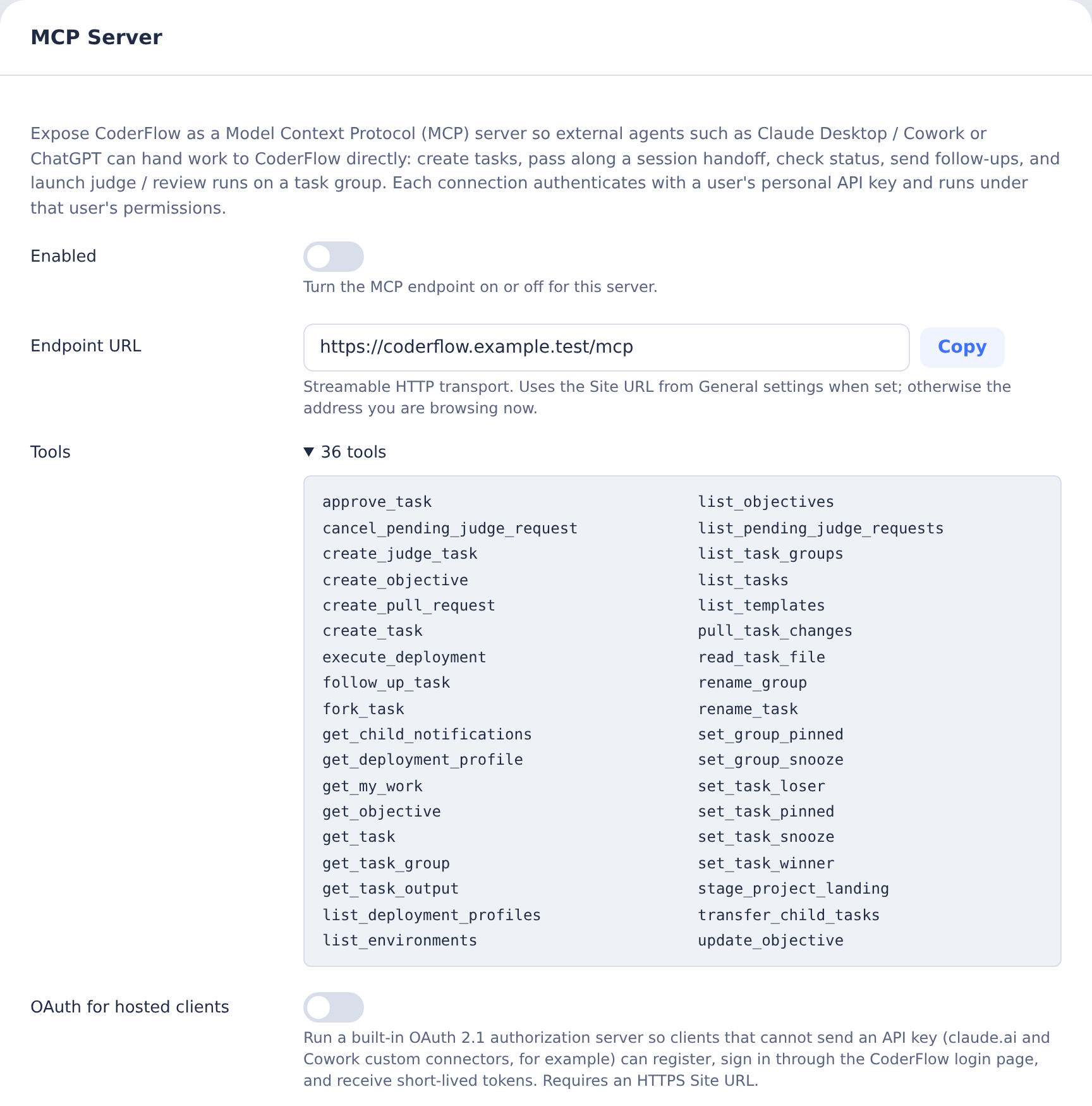
Enable the MCP Server
- Go to Settings → Integrations → MCP Server
- Toggle Enabled on and click Save
- Copy the Endpoint URL (for example
https://coderflow.example.com/mcp)
The endpoint uses the Site URL from General settings when one is configured; otherwise it reflects the address you are browsing from. Make sure the URL you hand to clients is reachable from the machines where those clients run. MCP and OAuth URLs are always built from the origin (https://host[:port]): the routes and the OAuth discovery documents live at the root, so a Site URL path prefix is not carried into them, and the public base URL setting must be an origin with no path.
The setting can also be pinned with the MCP_SERVER_ENABLED environment variable (true or false) on the server. When the variable is set, the Settings toggle is read-only.
The MCP server is off by default. Requests to /mcp return 404 while it is disabled.
Server Orchestration Policy
In CoderFlow Full, server Settings has an Orchestration policy card immediately after MCP Server. Edit opens the full Markdown policy, formatted, with a source view and Save. The card shows Product default until a server override is saved, then Customized. Reset deletes the server override and restores the product default after confirmation; it is disabled when no override exists. Viewing requires settings:view; saving or resetting requires settings:manage. Users without manage permission get View and a read-only preview.
The server policy is ORCHESTRATION.md at the setup repository root. An environment's environments/<env>/ORCHESTRATION.md replaces it entirely; otherwise the server policy replaces the product default. Nothing is merged. See Orchestration Policy for the default workflow, environment editor, permissions, and when changes apply.
Enable OAuth for Hosted Clients
Some clients cannot attach a static API key to a remote MCP server. claude.ai and Cowork custom connectors, for example, expect the server to implement the MCP authorization flow (OAuth 2.1 with PKCE and dynamic client registration). CoderFlow ships that authorization server built in.
- Set an HTTPS Site URL in Settings → General. The OAuth issuer is derived from it, and the MCP SDK refuses non-HTTPS issuers other than localhost.
- In Settings → Integrations → MCP Server, toggle OAuth for hosted clients on and click Save.
- Copy the Endpoint URL (for example
https://coderflow.example.com/mcp) and add it as a custom connector in the client.
When a client first calls the endpoint without credentials, CoderFlow answers 401 with a WWW-Authenticate challenge that points at the discovery document. The client registers itself, opens the CoderFlow login page in the browser (local login or SSO), shows a consent page naming the client, and receives tokens once the user approves. No key is copied anywhere.
Endpoints, all under the Site URL:
| Endpoint | Purpose |
|---|---|
/.well-known/oauth-authorization-server | Authorization server metadata |
/.well-known/oauth-protected-resource/mcp | Protected resource metadata for /mcp |
/mcp/oauth/register | Dynamic client registration |
/mcp/oauth/authorize | Login and consent, issues authorization codes |
/mcp/oauth/token | Exchanges codes and refresh tokens |
/mcp/oauth/revoke | Token revocation |
Token lifetimes:
| Token | Lifetime |
|---|---|
| Authorization code | 10 minutes, single use |
| Access token | 1 hour |
| Refresh token | 30 days, rotated on every use |
Tokens are stored only as hashes in mcp-oauth.json in the server data directory. The setting can be pinned with the MCP_OAUTH_ENABLED environment variable, and it has no effect while the MCP server itself is disabled.
Hardening the authorization server
Dynamic client registration is open by design: anyone who can reach the registration endpoint can register a client with any name. Two settings on the MCP Server panel close the resulting phishing path. Both are off by default so existing connections keep working; turn them on for production servers.
- Allowed OAuth redirect hosts. One hostname per line, with
*.example.commatching subdomains. Registrations and authorizations that redirect anywhere else are refused, including clients registered before the list was set. Loopback addresses used by local clients such as Claude Code andmcp-remoteare always allowed. For Claude connectors, allowclaude.aiand*.anthropic.com, and check the redirect host shown on the consent page the first time you connect. - Require fresh sign-in for consent. A number of minutes. Approving a new client then requires a login newer than that; an older browser session is sent back through the login page first. Local users re-enter their password (and MFA code when enrolled); SSO users are re-prompted by the identity provider because CoderFlow requests
prompt=login. This stops a walk-up on an unlocked, signed-in browser from silently authorizing a connector. On development servers started withDISABLE_AUTH, there is no login to refresh, so the rule is treated as satisfied.
Managing authorized clients
Users can list and revoke the clients they have approved:
# List my authorized MCP clients
curl -H "Authorization: Bearer $CODER_API_KEY" "$CODERFLOW_URL/api/mcp-oauth/grants"

# Revoke one client, or everything
curl -X DELETE -H "Authorization: Bearer $CODER_API_KEY" "$CODERFLOW_URL/api/mcp-oauth/grants/<client_id>"
curl -X DELETE -H "Authorization: Bearer $CODER_API_KEY" "$CODERFLOW_URL/api/mcp-oauth/grants"
Revoking a refresh token also revokes the access tokens issued with it. Deleting a user revokes everything they authorized, because tokens only work while the user still exists.
Dedicated MCP Listener
By default the MCP endpoint and its OAuth routes are served by the main CoderFlow port. Deployments can instead start a second HTTP listener that serves only the machine-facing MCP routes and expose just that port, keeping the main application port private. This is the same pattern as the messaging-integrations and webhook listeners, and like them it is route and port isolation inside one Node process, not a separate process or privilege boundary.
Set the following before starting the server:
MCP_INGRESS_MODE=listener
MCP_INGRESS_PORT=3004
MCP_INGRESS_HOST=0.0.0.0
MCP_INGRESS_PORT by itself also enables listener mode. The listener uses the same TLS configuration as the main server.
The listener serves:
GET /healthPOST /mcp(plus theGET/DELETEmethod-not-allowed responses)POST /mcp/oauth/token,POST /mcp/oauth/register,POST /mcp/oauth/revokeGET /.well-known/oauth-authorization-serverGET /.well-known/oauth-protected-resource/mcp
It does not serve the web UI, the authenticated APIs, or /mcp/oauth/authorize. Login and consent always happen on the main application, in the user's browser. Only bearer credentials (OAuth access tokens or personal API keys) authenticate on the listener; browser sessions do not.
When using the listener:
- Set Site URL in General settings to the main application URL users open in a browser. The OAuth metadata publishes the authorization endpoint there.
- Set Public base URL for MCP clients on the MCP Server panel to the public HTTPS address of the listener, for example
https://mcp.example.com. The endpoint URL, discovery documents, and token endpoints are published there. TheMCP_PUBLIC_BASE_URLenvironment variable pins the same value. - Check the read-only Dedicated MCP listener field to confirm the server sees the expected mode and port.
Internal servers and hosted connectors
This split is what makes hosted connectors work against a CoderFlow that is not on the public internet. Claude connectors make their MCP, registration, and token requests from Anthropic's servers, but the login and consent steps run in the user's browser. With the listener:
- Expose only the listener port through the firewall, ideally restricted to Anthropic's published egress IP ranges, with a publicly trusted certificate.
- Keep the main application internal. Users on the internal network reach the login and consent pages there.
- Set the redirect allowlist to the Claude callback hosts so nothing else can register.
Connect a Client
Clients that support the MCP authorization flow (claude.ai and Cowork custom connectors, and recent versions of Claude Code, Claude Desktop, VS Code, and Cursor) can use OAuth as described above: add the endpoint URL and sign in when prompted.
Any client can instead use a personal API key sent as a Bearer token on every request. There is no Web UI page for creating one; use any of these routes:
- Run
coder login(username and password) orcoder login --sso(OIDC device flow). The server issues a key and the CLI stores it in the active profile in~/.coder/config.json. - Sign in through the VS Code extension's Profile Manager; it stores the returned key in the selected profile.
- Call
POST /api-keyswith{ "name": "MCP" }from an authenticated session; the secret is returned once.
See API Keys for rotation and revocation. Replace <API_KEY> in the examples below.
Claude Code
claude mcp add --transport http coderflow https://coderflow.example.com/mcp \
  --header "Authorization: Bearer <API_KEY>"
Then, from any Claude Code session:
Hand this work off to CoderFlow in the
billingenvironment. Summarize what we did and what is left.
Claude Code calls create_task with a handoff object, and the resulting task appears in the CoderFlow dashboard.
Claude Desktop and Cowork
With OAuth enabled, add CoderFlow as a custom connector using the endpoint URL. Cowork opens the CoderFlow login page, the user approves the consent screen, and the connector is ready. Organization administrators can add the connector once for everyone.
Without OAuth, Claude Desktop can still launch local MCP servers from claude_desktop_config.json. Use the mcp-remote bridge to reach CoderFlow's HTTP endpoint with a Bearer token:
{
  "mcpServers": {
    "coderflow": {
      "command": "npx",
      "args": [
        "-y",
        "mcp-remote",
        "https://coderflow.example.com/mcp",
        "--header",
        "Authorization: Bearer <API_KEY>"
      ]
    }
  }
}
Restart Claude Desktop after editing the file. The CoderFlow tools then appear in Cowork sessions.
VS Code and GitHub Copilot
Add CoderFlow to .vscode/mcp.json (workspace) or your user MCP settings:
{
  "servers": {
    "coderflow": {
      "type": "http",
      "url": "https://coderflow.example.com/mcp",
      "headers": {
        "Authorization": "Bearer <API_KEY>"
      }
    }
  }
}
To keep the key out of the file, VS Code supports input variables:
{
  "inputs": [
    { "id": "coderflow-key", "type": "promptString", "password": true, "description": "CoderFlow API key" }
  ],
  "servers": {
    "coderflow": {
      "type": "http",
      "url": "https://coderflow.example.com/mcp",
      "headers": { "Authorization": "Bearer ${input:coderflow-key}" }
    }
  }
}
Other clients
Any client that supports the MCP Streamable HTTP transport with custom headers can connect. The server is stateless: it does not issue session IDs and does not open a standalone server-to-client event stream, so it works behind ordinary reverse proxies and load balancers without sticky sessions.
Tasks as clients (agent orchestration)
CoderFlow tasks can themselves be MCP clients of the server, so an agent running in a task, including one launched by an automation, can create, follow up, judge and inspect other tasks. No API key is involved: the server injects a coderflow entry into the task's MCP configuration at launch with a task-bound token.
To have CoderFlow supply a project coordination workflow and the effective orchestration policy, create a single-agent normal task with role: "orchestrator". This requires Full edition and the environment's Task orchestration setting below. The role does not change child limits, token permissions, or notification rules; automatic review targets its children rather than the orchestrator itself. See the Project Orchestrator guide.
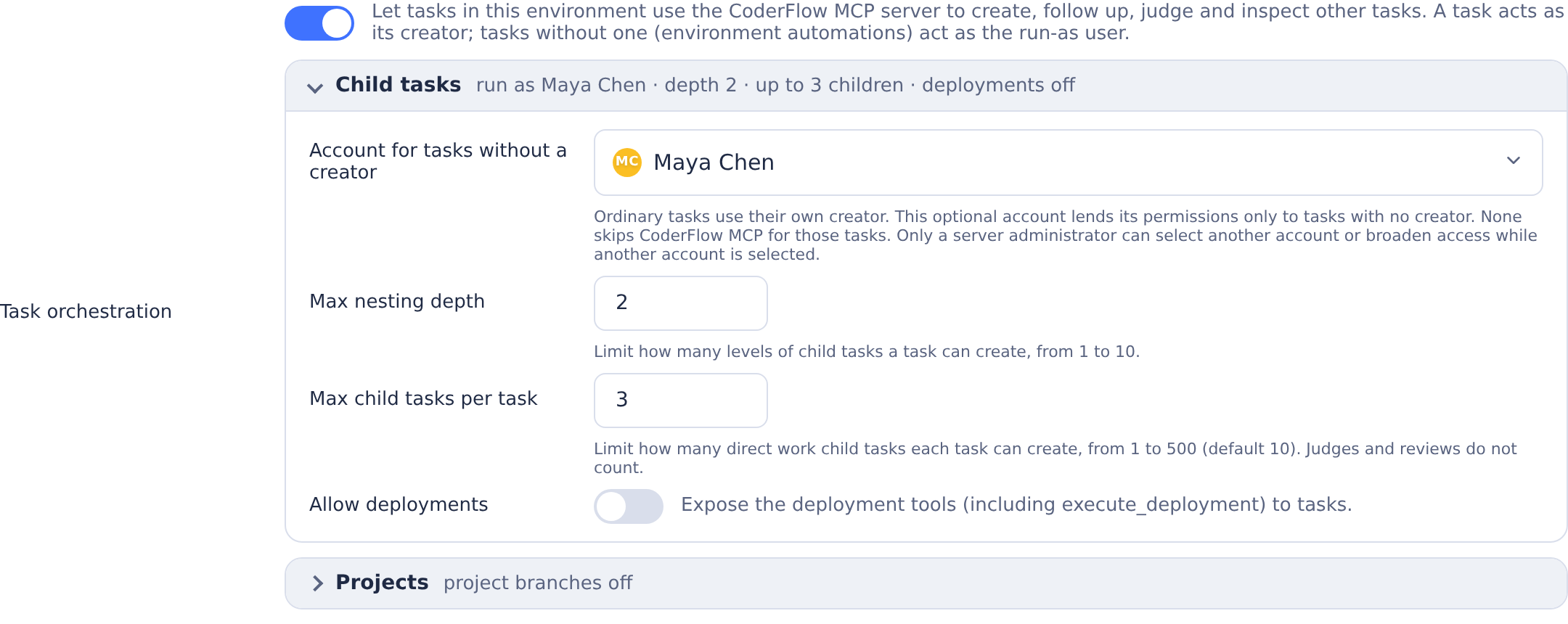
To turn it on for an environment:
- Enable the MCP server as described above.
- Open Environments → Overview, find Task orchestration below the MCP Servers row (it requires the
environments:mcp-serverspermission), switch it on, and click Save. - Optionally set a run-as user, the nesting and child limits, and whether the deployment tools are exposed.
Every task launched in that environment afterwards, whether from the Web UI, an integration, or an automation, gets the coderflow server in its MCP configuration (Claude, Codex, Gemini, Bob, Kimi, and Grok using its default ACP transport). The entry appears as a read-only chip in the MCP Servers row; the name coderflow is reserved for it.
Grok receives the managed configuration through the shared ACP client. The legacy GROK_TRANSPORT=streaming-json fallback bypasses that client and does not load the mounted MCP snapshot. End-to-end verification of HTTP MCP headers with the Grok CLI is still pending; its ACP interface advertises HTTP support, but the local verification attempt was blocked by authentication.
Who the task acts as. The token names the task, not a user. On every call the server resolves the acting user:
- A task with a creator (Web UI, integration, personal automation, or a task created over MCP) acts as that creator.
- A task with no creator, which is what an environment-scope automation launches, acts as the environment's run-as user. With no run-as user configured, such tasks get no
coderflowentry and the launch log records why.
The acting user's role bindings apply exactly as they would for a personal API key, so a run-as user should be a dedicated service account with only the tasks:* permissions it needs. Because the run-as user lends its permissions to every creator-less task, delegating to an account other than yourself requires a full server administrator, and so does turning the feature on, allowing deployments or child approval, or raising the limits while such an account is the run-as user. An environment admin can always narrow the setting, clear the run-as user, or name themselves. Beyond those bindings the token is narrowed in three ways: the deployment tools (list_deployment_profiles, get_deployment_profile, execute_deployment) are not registered unless Allow deployments is on, the deployment profile authoring tools are offered only to tasks with a creator (see Editing deployment profiles from a task), and follow_up_task refuses the calling task's own ID unless it schedules a wake-up (deliverAt or deliverInMinutes).
Approve children into project branches (allow_child_approval, under Projects) is off by default. When enabled, task tokens can call approve_task on their finished descendants at any depth, never themselves or unrelated tasks. For approve_task, the acting user needs tasks:approve for their own tasks or tasks:approve_any for another user's tasks. Personal API keys, OAuth callers and reviewer/judge task tokens cannot use the project-branch tools.
Project landing (project_landing) chooses how project orchestrators land their project branch: pull_requests (the default) or approval. It applies only while child approval is on. With approval, the orchestration root also gets stage_project_landing; see Landing a project through approval. Set it in the environment settings panel (Land projects through, shown while child approval is on) or with change_environment_resource on the coderflow_mcp resource. Saves that omit it keep the stored value. An orchestrator launched with projectLandingMode uses its own choice instead.
approve_task takes taskId, an optional branch, optional branches overrides keyed by repository name, optional repositories, optional syncBase (defaults to false), and an optional commitMessage (defaults to the child's /task-output/commit-message.txt for normal approvals, or Merge <base> into <project branch> for base sync). Every target must start with the server-enforced project/ prefix; other targets return branch_not_allowed. Full names are validated with git check-ref-format; malformed target refs return invalid_branch. Without branch, the server derives project/<root-name-slug>-<short-root-id> from the caller's lineage root, records it as projectBranch on that root and reuses it for all children and repositories. Names are length-limited and remain stable after renaming the root. Normal approvals replay child work onto the existing remote project tip before pushing; syncBase: true instead lands a reviewed two-parent base merge.
For a new project branch, the server resolves the current remote tip of the child's launch branch (branches[repo], or the repository's configured branch), then creates the remote ref at that exact commit through the same credentialed Git path used for approval. This can be newer than the child's original launch commit and adds no child content. Creation is conditional on the ref remaining absent; a refused creation returns branch_creation_failed. If another approver creates the ref at a different SHA first, the creation lease refuses to overwrite it. Retry approval to take the existing-branch verification and rebase path. The server then verifies the now-existing branch before rebasing onto it and pushing the child's changes. When Git confirms this approval created the branch, verification allows up to three lookups for a branch 404, with 500 ms and 1,500 ms backoffs to allow GitHub REST to catch up. Existing branches and branches created by another approver do not get these retries. A persistent 404 returns branch_policy_unavailable; other policy failures remain immediate refusals.
If verification or preparation fails, the server attempts to delete its newly created ref with a Git lease requiring that it still point at the base SHA. A branch that has moved is never deleted. Deletion restrictions or concurrent changes can leave the ref in place; cleanup outcomes appear in details.branch_cleanup.
Approval uses strict provider policy lookup, refusing the verified remote default, configured default branches, and remote/config-protected branches. Missing or incomplete policy data refuses approval. GitHub checks the protected flag from GET /repos/{owner}/{repo}/branches/{branch} and applicable active rules from GET /repos/{owner}/{repo}/rules/branches/{branch}. These checks require Contents read and Metadata read, with no Administration permission; approval still needs repository write access for Git pushes. No GraphQL classic-rule enumeration is used: GitHub evaluates classic wildcard rules against the existing branch after creation. Missing flags, failed lookups and incomplete ruleset pages fail closed.
Conservatively, any applicable GitHub ruleset rule blocks agent approval, including signed-commit requirements and unknown rule types. The REST protected flag includes both classic protection and rulesets; these read APIs cannot safely establish that a branch with only selected ruleset types has no classic protection, so approval does not narrow protection to a subset of rule types. Azure DevOps and other providers without strict protection-policy verification are refused. SSH-form URLs (git@host:owner/repo and ssh://git@host/owner/repo) are normalized to HTTPS; unsupported transports return unsupported_remote_url.
The server rechecks policy immediately before pushing through its credentialed Git path. Residual risk: policy lookup and push are separate operations. An administrator changing a project/... target into the default branch or protecting it in that narrow interval could evade the lookup. The mandatory project prefix makes accidental deployment-branch targeting impractical, and the remote's own protection remains the final backstop; credentials with bypass rights can weaken that backstop. Humans review the project branch through a pull request; approve_task does not create or merge one.
The result includes projectBranch and each successful repository's branch, launch branch base, resolved launch-branch tip base_sha, commit_sha, and pushed. For a new project branch, base_sha is the exact commit used to create it. For an existing project branch, it is the launch-branch tip used to exclude inherited work. Approval metadata retains the acting user and approving task ID, linked on the child's page.
A rebase conflict returns error: "approve_conflict" and details: { repository, files }. Preparation runs in a temporary clone, leaving the child's HEAD, index and working tree unchanged on failure. Send the child a follow-up to sync onto the project branch with git pull --no-rebase --autostash origin project/... (replace project/... with the actual branch), resolve any conflicts, and inspect the merge state. If the pull leaves MERGE_HEAD for an ordinary project-sync merge, have the child commit the resolved merge first, then restore/stage any remaining autostashed work, rerun tests, and review the result before retrying normal approval. If the resolution commit already contains all the autostashed work, retry with the clean index; no additional edit is required. The unlanded child commits and merge resolution remain eligible for approval. If a fast-forward pull instead leaves an autostash-apply conflict with no MERGE_HEAD, resolve it, run git add, optionally drop the kept autostash entry after verifying its work is restored, rerun tests, and retry normal approval. The dedicated base-sync flow below instead leaves its merge uncommitted. Commits already reachable from either the current launch-branch tip or the current project tip are excluded. A child synced at an earlier project tip does not replay landed commits, even if later project work edited or removed their lines.
Use --no-rebase for this cross-branch sync so inherited launch-branch commits keep their identities. A child launched from or fast-forwarded to newer main can have main-only commits absent from the project branch. Rebasing onto the project branch rewrites those commits, and approval's ancestry-based selection can then include their copies as child work. Merge-based sync preserves their identities; if the inherited histories diverge, approval returns approve_divergent_history as described below. If the child has already rebased main-only commits onto the project branch, use that same recovery procedure to reconstruct only its own work before approval; a later merge-based pull does not undo the rewritten copies.
When the child has merge commits of its own, including a resolved project-sync merge, approval preserves their cumulative changes and merge resolutions together with any staged work in one approval commit, including when committing the resolution leaves the index clean. The server first verifies that the replay base excludes all inherited launch/project commits. Merges already inherited from the launch or project branch are excluded from the child's work.
If the launch and project merge bases diverge, or no single replay base can exclude the inherited history while preserving the child's merge resolutions, approval refuses with error: "approve_divergent_history" and repository/branch details. The child workspace and project tip remain unchanged. To recover, keep the original work as a reference, start from the current project tip, and reapply only the child's own changes and merge resolutions as staged, uncommitted work before retrying. Do not copy the entire old tree onto the project tip: that could also introduce inherited launch-branch changes. If the project merge base cannot be computed, such as with shallow history, approval falls back to its existing launch-branch replay base, with the same check before combining child-owned merges.
To bring the base branch into the project, use approve_task({ taskId, syncBase: true }) after reviewing a dedicated sync child. This option reuses the existing descendant authorization, source lock, branch protection checks, credential handling and partial-approval reporting, while preserving merge ancestry explicitly.
- At the end of each phase and before opening a PR, fetch the current base and project refs and check mergeability with
git merge-tree --write-tree origin/<base> origin/<project>. Exit 0 means clean; exit 1 means conflicts. A failed check is not a clean result. Check again if the base moves. - If the base moved in overlapping files, launch a child on the current project branch tip. Fetch the base into its tracking ref (for example
git fetch origin refs/heads/main:refs/remotes/origin/main, even if the clone normally fetches only the project branch), then rungit merge --no-commit --no-ff origin/main, substituting the project's base.--no-ffkeeps the merge pending even when a fast-forward is possible. - Resolve every conflict, stage the complete resolution, and re-run the combined project tests on the merged result. Leave the merge staged and uncommitted with
MERGE_HEADpresent. The orchestrator reviews the resolution and test results, then callsapprove_taskwithsyncBase: true; userepositoriesto select the repositories being synced. - The server verifies that the child's HEAD equals the current remote project tip, that the single
MERGE_HEADis the current base tip or a commit reachable from it, and that there are no unmerged entries or unstaged/untracked changes. The base comes from the root project's launch branch, falling back to the repository branch configured in the root's environment, never the child's environment default. Missing root repository/base configuration or a different remote for the same repository name is refused. Ancestry and mergeability checks run in a fresh repository without child object alternates: base and project history come only from the remote, while the reviewed staged tree is imported separately with object validation. - The resulting commit has exactly
[project tip, MERGE_HEAD]as parents, even if its tree equals the project tree. The default message isMerge <base> into <project branch>; an explicitcommitMessageoverrides it. The server checks the candidate withgit merge-treeagainst the fetched base; even a reachable older merge parent is refused if newer overlapping base changes still conflict. It refreshes the base near push and revalidates the candidate if that tip moved, then checks once more that the base still matches the validated tip. The same fail-closed branch policy applies, and the server pushes only toproject/with a lease on the validated project tip. It never creates a missing project branch in this mode. A moved tip is refused, including moves during the push window; prepare and review a fresh merge on the current project tip.
project_repository_unavailable, base_branch_unavailable, base_sync_merge_required, invalid_merge_head, unresolved_merge, and stale_project_tip identify preparation refusals; a push race reports non_fast_forward in the repository result. A normal approval returns base_sync_required only when its pending merge is based on the current project tip and its single merge parent is reachable from the project base. Otherwise it returns merge_resolution_commit_required: commit the resolved ordinary project-sync merge in the child, restore/stage any remaining autostashed work, rerun tests and review, then retry normal approval even if the index is now clean. For an intended base sync at a stale project tip, prepare and review a fresh merge from the current tip. Failed preparation or push preserves the child's HEAD, staged resolution and merge state. After a successful push, the workspace follows the new project tip and its pending merge state is cleared. Results add sync_base: true and merge_head; base_sha is the base tip validated near push, which may be newer than the reviewed merge parent. base_sync_conflict includes the conflicting files against that base and requires a fresh reviewed merge of its latest tip plus combined tests. base_branch_moved refuses a base that changes again during validation. These checks cannot lock the base branch: it may still move after the final read, so recheck mergeability after syncing and before handoff.
Both normal and base-sync approval commits strip existing Co-Authored-By: trailers, the CoderFlow Learn more line and agent-generated footers such as 🤖 Generated with [Claude Code](...). Unless the server setting coderflow_attribution is false, they append exactly one copy of:
Co-Authored-By: CoderFlow <[email protected]>
Learn more: https://coderflow.ai
This applies to every newly replayed child commit as well as the approval/merge commit; inherited base and project commits are unchanged. With attribution off, existing attribution is stripped without adding a trailer. Default and caller-supplied create_pull_request bodies use the same normalization. The Web UI approval dialog retains its existing behavior; its injected fallback now also reads the setup setting when /settings is unavailable.
Pushes across repositories are not atomic: a network failure can leave a partial approval, with per-repository results. Repository changes must have been synced before approval; uncommitted edits must be staged. Normal approval accepts unlanded committed child work even with a clean index, after excluding inherited launch/project history. If there is no child work left, or the prepared result has the same tree as the project tip, it returns no_changes_to_approve without pushing a duplicate commit or clearing existing approval attribution. This also protects retries after a successful approval. Approval holds the same source-operation lock as follow-ups. Source HEAD, index and working-tree state are checked before pushing and updating the workspace; newer edits are preserved and reported as source_changed or a workspace warning after a successful push. After a successful push, the child follows the local project branch; if it started on another branch, that original branch remains unchanged. Git failures include redacted diagnostic output and distinguish authentication/token expiry, non-fast-forward races and unsynced edits.
After landing each child's reviewed work with approve_task, call create_pull_request to open one PR per repository for a human to review and merge. The caller may be the root or any descendant; the server follows actual parent links and requires an existing projectBranch on the root. It does not create a project branch merely to open a PR. A project that lands through approval is refused with landing_mode_approval, and its root is not offered the tool, unless the root already has a pull request recorded for its project branch (for example, one opened before the setting changed). The landing mode is the root's projectLandingMode, otherwise the Project landing setting of the root's environment, even when the caller runs in another environment. It never comes from the orchestration policy.
All inputs are optional: title defaults to the root task's name, normalized to single-line text without control characters and capped at 256 characters (falling back to the project branch for an empty name); body defaults to a short summary with a fixed-label link to that task, or its ID as plain text when no site URL is configured; repos selects repository names (otherwise all writable remote repositories); draft defaults to false. branch overrides the head for all selected repositories and must start with project/; base overrides their target. Defaults use the recorded root project branch and the root's per-repository launch branch (branches[repo], falling back to the configured repository branch). Missing or invalid bases are refused rather than guessed.
The environment's Git provider checks that the head exists remotely and has commits beyond the base. An open PR for the same head and base is returned unchanged, including its existing draft state. Each repository result contains status (created, existing, no_changes, skipped, or failed), url, number, head, and base; URL and number are null when no PR is returned. Repositories with no remote project branch are skipped, with reason: "no_project_branch" and no_changes: true; no branch is pushed and no PR is opened for them. An explicitly requested branch that does not exist returns status: "failed" with error_code: "head_not_found", rather than being skipped. A missing base or inability to read either branch is still a failure. Created and existing PRs are recorded on the root task for Web UI links.
Every created or reused PR reports mergeable (true, false, or null), mergeability (clean, conflicting, or unknown), and conflicting_files. The provider's computed mergeability is preferred. When it is unavailable, the server checks the remote tips with git merge-tree in an isolated temporary repository; it also uses Git to list conflicting files when the provider reports conflicts. Git results include head_sha, base_sha, and mergeability_source. If provider state says conflicting but Git checks a clean merge, the response retains mergeable: false and mergeability: "conflicting", sets conflicting_files: null, and explains the disagreement in mergeability_error. It omits the clean check’s SHAs from that conflict report; refresh both checks before handoff. The fallback fetches at most 300 commits of history per tip; insufficient history, unavailable Git support, or a failed fetch/check produces an explicit unknown result or conflict-list error, never a clean result. conflicting_files: null means the list could not be determined; an empty list accompanies a clean merge. Skipped/no-change/failed entries use mergeability: "not_applicable".
Inspect every repository result before handing PRs to a human. A PR can be created or already exist while mergeable is false: resolve it through the reviewed base-sync flow, re-run the combined tests, and call again to refresh the result. An existing PR's body and draft state are preserved. These are point-in-time checks; later branch movement can change mergeability. This tool never pushes or merges; a human reviews and merges the PRs.
Landing a project through approval
With Project landing set to approval, or a root launched with projectLandingMode: "approval", the orchestration root lands its project branch through one approval of its own task instead of pull requests. Children are still approved into the project branch with approve_task, and later children launch on it.
At the checkpoint, the root calls stage_project_landing. Only the root can call it, and the acting user needs the same approval permission as for create_pull_request. For each writable repository, the tool:
- Checks that the workspace is on the project's base branch, with no merge, rebase, cherry-pick or revert in progress.
- Fetches the project branch and its base. Repositories without the project branch are
skipped, and a project branch already contained in the base isno_changes. If the merge base is outside a shallow workspace's history, the workspace is deepened by up to 300 commits. - Refuses, without changing the workspace, if it has local commits (
workspace_diverged), if the project conflicts with its base (landing_conflict, with files), or if the orchestrator's uncommitted changes touch files the project or the newer base changes, including a file where they add a directory or the reverse (workspace_overlap, with files). - Fast-forwards the workspace to the latest base and stages the project branch's changes uncommitted, beside the orchestrator's other work.
mode is squash (the default) or merge. A merge stage leaves MERGE_HEAD in place, so approval creates a merge commit whose second parent is the project tip and keeps the child commits in the base's history. repos limits staging to the listed repositories. A configured repository that is not cloned in the workspace is refused with repository_unavailable unless repos leaves it out. Calling the tool again replaces the previous stage once every check passes: it restores the files the previous stage changed, then stages again. A refused call keeps the previous stage, and clear: true only removes it. Removing a stage touches only the files it staged: files HEAD does not have are deleted first, then HEAD's versions are restored, so a stage that swapped a file and a directory is undone too. If other files are in the way, for example a file added inside a directory the stage created, the call refuses with landing_undo_blocked and lists them, changing nothing. While a stage exists, the root task refuses Pull Latest, pull_task_changes and pullLatest follow-ups with project_landing_staged; staging again updates the stage to the latest base. A stage is tied to the commit it was staged on. If the workspace HEAD moves anyway, clearing and staging refuse with landing_stage_stale and keep the record, because the staged changes can no longer be told apart from other work. Restore the staged files, then call with forget: true, which drops the record without touching files. If the environment stops landing projects through approval, or turns child approval off, while a stage exists, the root keeps the tool for clear and forget only, so the stage can still be removed. Approving the root also consumes the stage. The root records the current stage as projectLanding: for each repository, the base branch, the base and project commits staged, their merge base, the staged tree, and the number of files.
When a person approves the root, approval refuses with HTTP 409 before committing if the project branch no longer points at the staged commit (project_branch_moved) or, for a merge stage, if the merge is no longer in progress (project_landing_changed). The orchestrator stages again and the person reviews the new diff. Each approval moves the repositories it commits into the root's projectLandings history, with each commit and whether it was pushed. This happens even when another repository fails, or when a push fails and the commit is kept for a retry. A retry updates that record with its outcome: the pushed commit, or the commit kept again, even when pulling again rewrote it. Repositories not yet committed stay staged and can be cleared or staged again on their own. A commit-only approval (Push unchecked) counts too: once every repository is committed, the stage is gone and Pull Latest works again. Push the commits before staging the next phase. With delete_project_branch: true (the Approve dialog's Delete the project branch after landing; people only), approval then deletes the project branch from each repository whose landing it pushed to the base, with a lease on the staged tip. The response's project_branch_cleanup (also in details when another repository fails and the response is an error) and the landing record's branchCleanup report deleted, already_deleted, branch_moved (kept), kept_for_new_branch or failed per repository. A person can delete a branch an approval kept later with POST /tasks/:id/project-branch-cleanup (the task page's Delete Project Branch), which deletes it from each repository whose latest landing was pushed, with a lease on the tip that landed, and records the outcome the same way. It never pushes to a repository the environment has since marked read-only, which reports read_only. Approval pushes to the base like any task approval. For a protected base, the Approve dialog commits to a new branch and opens a pull request by default; if the pushing identity may bypass the protection, clearing Create new branch pushes directly. A merge stage stays a merge commit either way.
A visible task or objective retains parentTaskId, supervisorTaskId, sourceObjectiveId and parentObjectiveId even when you cannot open the referenced parent or lead. These structural ids support nesting, moves and Undo; they do not grant access to the parent or disclose its name or content. Other hidden task references are removed.
Lineage and limits. Tasks created from a task record parentTaskId, rootTaskId and taskDepth (visible in get_task, the task list, and on the dashboard, where list layouts nest the child beneath its parent and flat layouts show a Child task pill). Judges started with create_judge_task and deployments started with execute_deployment are children too, and judges the server launches on those children's behalf (auto-judge, review-loop rounds, verification passes) join the same generation instead of starting new roots. The environment's Max nesting depth (default 3) and Max child tasks per task (default 10, configurable from 1 to 500) bound the fan-out; the tools answer task_depth_exceeded or child_task_limit_exceeded when a call would cross them. The child limit is enforced atomically where tasks are created, so concurrent calls cannot overshoot it, and it counts work children (including forks and deployments) regardless of who launched them. Judge and review tasks retain their lineage but neither reserve nor consume child slots, including auto-judges, review-loop rounds and verification re-runs. Judge task tokens, including resubmits of judges, cannot call create_task, fork_task, execute_deployment or create_judge_task, and work forked beneath reviewers is charged to their nearest non-reviewer ancestor, so additional reviewers do not provide additional work budgets. Their inspection and reporting tools remain available. Reviewer creation is bounded by the depth limit and review-loop settings, not by max_children. Forks always count as work children, including forks of reviewers, and receive the normal work-task MCP tool permissions. A multi-agent create_task counts one child per agent. On the dashboard, a user can move a nested child out of its parent with the up-arrow on its row; that only changes where the task is shown (it drops the pill and leaves the parent's pin and snooze cascades), while the lineage fields and these limits stay as recorded.
Stored child notifications follow current access even after the child and its sources are deleted. Environment renames update their saved access records too; reusing the old environment name does not grant access to those updates.
Waiting on children. Child tasks run asynchronously, and the parent does not have to poll them. When a child finishes (completed, failed or interrupted, or is deleted before it finishes), CoderFlow queues a short notification on the parent. The notification gives the child's ID and name, its outcome, exit code and finish time, the end of its latest reply, and a pointer to get_task_output for the full results. create_task takes notifyParent to choose how the parent hears about each child:
wake(the default): CoderFlow never interrupts the parent's turn. Once the parent's turn has ended, CoderFlow starts a new parent turn carrying every queued notification. Children that finish within a few seconds of each other share one turn, so a parent that is only waiting can simply end its turn.queue: the notification waits and is added to the parent's next turn, whoever starts it.none: nothing is queued; pollget_taskas before.
A notification is consumed once the turn that carries it has started, or when the parent itself reads that finished child with get_task or get_task_output. Each one is delivered once.
CoderFlow resumes a parent on its own only if all of these hold:
- the parent's last turn completed;
- the user the parent acts for may still continue it;
- fewer than 200 automatic turns have run in a row.
Otherwise notifications wait for the next message. If CoderFlow cannot confirm whether an automatic turn started (for example, Docker failed mid-launch), it does not retry on its own; the next message carries the notifications. A parent container stopped for inactivity is restarted for the delivery.
Details of a child are shown only to people who can view that child. That applies to the task page, to get_child_notifications, and to turns someone other than the parent's owner starts. On the parent, an automatic turn records only that child tasks finished or were reviewed; the child names and outcomes shown beside it appear only to viewers who can see those children. The full notification goes to the agent alone. A child the parent's user can no longer view is reported without its details.
Deleting a child that is still running records the deletion on its parent first. If that cannot be saved, the child is not deleted and you can try again.
Notifications survive a server restart, including children that finish while the server is down. get_child_notifications lists what is queued and why delivery is waiting. On the parent's task page, automatic turns appear as Child task update with links to the children, and queued notifications are listed under Child tasks.
Children created before this feature, individual judges, deployments and fork_task children do not report until the parent sends them follow_up_task. That call defaults to wake; pass notifyParent to choose another mode.
Transferring children to another lead. Forking a lead copies its conversation but not its children: they keep reporting to the original lead. To let another task coordinate them, transfer them: transfer_child_tasks (from inside the new lead, toTaskId defaults to the calling task), POST /tasks/:id/child-transfers with childTaskIds and an optional fromTaskId, or, in the Web UI, Take over… on a fork whose source still coordinates children (Transfer… in the lead's Child tasks box, which also shows its child slots in use). The new lead then receives their completion, failure and interruption notices, including any still queued, counts them against its Max child tasks per task, and may follow them up, set notifyParent, review, approve and fork them like children it created; the old lead stops hearing about them. Both get a short notice with their next turn. Child IDs, containers, conversations, unapproved work and the creation lineage (parentTaskId, rootTaskId, taskDepth) are unchanged; get_task shows the current lead as supervisorTaskId and the latest move (who, from where, when) as lastTransfer, and the dashboard nests the child under its new lead. A child in a task group moves with its group. Select the children still in use: finished children count against the new lead's limit too.
People need permission to change every moved child, its current lead and the new lead, and the user the new lead acts for must be able to change the children. From inside a task, an agent may adopt children of a lead it was forked from or that it leads, hand its own children to a fork of itself or to a task it leads, or move children between tasks it leads; judge and review tasks cannot transfer children or receive them. A transfer is refused, without changing anything, when the new lead's environment has task orchestration off, the move would exceed the new lead's child limit or the depth limit or create a cycle, the children and the new lead belong to different projects and either already has a project branch, staged landing or pull requests (where the server setup turns on child_transfer_project_join, off by default, a fork of a task in the children's project that has none of these of its own joins their project instead: its approvals and pull requests use that project's branch, joinedProjectRootTaskId in the result and on get_task, and the project's root still stages its landing), a child is being deleted or approved, a task is still being created below a child that would move deeper or below a moved review (try again shortly), a child was already transferred 200 times (every transfer stays on record), or a queued notification about a child is being delivered to the old lead or may already have been (continue the old lead once, then try again). Repeating a transfer is safe.
Detaching children from their lead. To let children go so that no task coordinates them, call transfer_child_tasks with detach: true and no toTaskId, POST /tasks/:id/child-detachments (where :id is their current lead) with childTaskIds, or, in the Web UI, choose No lead (detach) in the lead's Transfer… dialog. The children keep running, but no task receives their notices, counts them against its Max child tasks per task or coordinates them, and each becomes a root heading its own project (its own children stay with it). The old lead's queued updates about them are discarded and it gets a short notice. get_task then shows supervisorTaskId: null, detached: true and the move as lastTransfer. People need permission to change every child and the old lead; from inside a task, an agent may detach only children it coordinates, directly or through tasks it coordinates. A detach is refused like a transfer, and also when the children's project already has a project branch, staged landing or pull requests (project_has_landing_state), or while a task is being created or approved below a child. Repeating it is safe; a detached task cannot be transferred to a lead again.
Auto-review loops report one child_review notification to the variant's parent whenever the loop stops, even if no new variant turn ran. A loop continued in the Web UI after running out of rounds reports again when it next stops. It includes the stop reason, rounds used, group and variant IDs and names, each reviewer's agent and verdict, improvement counts by priority, and pointers to get_task_output and get_task_group. When CoderFlow stops a loop while reviewers of its round are still running (for example because not every reviewer could be relaunched), the notification waits until they finish, so it carries their verdicts; a loop someone stops with Stop is reported at once. A follow-up a parent sends a child while the child's loop runs does not end the loop: the loop's next feedback waits for that turn. A single review run launched by a task with create_judge_task (without reviewLoop) reports once to the variant's parent after all reviewers finish. Both use the variant's notifyParent mode and the usual parent delivery holds. Stops recorded and single review runs completed while notifyParent is none remain silent even if a later follow-up switches the mode to wake. If a loop is stopped while its variant is still running, the stop is reported immediately and the variant reports its eventual completion separately. Loops that stopped before review notifications were introduced are not replayed. Reading the variant with get_task or get_task_output settles only its matching completion notification, not a review notification. These review notifications survive restarts and appear in get_child_notifications. On the parent's task page they appear alongside child completions: queued ones are listed under Child tasks, and delivered ones appear beside the turn that carried them. Each shows the variant's name with a link, the stop reason (or Review run finished for a single review run), the rounds used, and each reviewer's agent and verdict with improvement counts by priority. It ends with a Review group link that opens the group's reviews. As with completions, people who cannot view the variant see only Child task (details hidden). When the variant is a judge that evaluated work not everyone who can view the parent may open, the notification says only that a review finished, under the judge's neutral name (Review), without the group's name, stop reason or verdicts; people who can open such a judge but not what it evaluated see its notifications as hidden.
A child with queued follow-ups reports after the queue drains, rather than after every intermediate turn. A paused queue also reports, so the parent can act.
Token lifetime. The task token is valid for 30 days and is re-minted whenever a stopped task container is started again, so long-lived tasks keep working after a restart. Deleting the task, turning the setting off, or removing the acting user revokes access immediately, since the server re-checks all three on every call. The token can only fetch MCP tools; it is not accepted by the git credential helper, and git container tokens are not accepted by /mcp.
Tools
| Tool | What it does |
|---|---|
list_environments | Environments the user can see, with repositories, default agent, and whether the user may create tasks there. |
preview_environment_generation | Preview detected settings for a repository or pending Draft; read-only. See Generate an environment Draft. |
generate_environment_draft | Generate a Draft, or fill a pending Draft, with a required retry-safe requestId. Requires confirmation; not offered in Ask. |
list_templates | Task templates in an environment, including parameter definitions. |
create_task | Create and start a task. Accepts instructions, an optional template and parameters, agent or an agents list (several agents as one task group), groupId or sourceTaskId (add a variant, promoting a stand-alone source into a group), optional model, reasoningEffort and speed for one explicit agent, branches, staged, file attachments, and a handoff object. Optional role: "orchestrator" starts a single-agent normal project orchestrator, optionally with its own projectLandingMode. From inside a task, notifyParent (wake, queue or none) chooses how the calling task hears that the child finished; see Waiting on children. |
get_task | Current status of a task and the agent's latest visible response (tail-bounded, full text on request). The agent-written summary is opt-in and comes with provenance that shows how many follow-ups it predates. Also the task's groupId, optional role ("orchestrator"), a failure object for failed tasks, and the variant labels of judge/review tasks. |
get_task_output | Everything needed to act on a finished task: the best available summary, the parsed judge/review recommendation, the visible agent responses across turns, failure diagnostics, and a listing of the files under /task-output. Per-variant artifacts are available on request. |
read_task_file | Read any file under a task's /task-output directory, paged by byte offset, so large artifacts (patches, logs, debug streams) never have to be returned whole. |
list_tasks | Individual tasks visible to the user as a flat list, newest first, with optional environment, status, ownership, pinned, groupId, and snooze-inclusion filters. Each task includes its optional role ("orchestrator"). Currently snoozed tasks are excluded by default. |
list_task_groups | Task groups visible to the user, newest first, one rolled-up entry per group, plus stand-alone tasks that belong to no group. Optional environment, status, ownership, pinned, and snooze-inclusion filters. Currently snoozed items are excluded by default. |
get_task_group | One task group with its rollup and the variant and judge tasks that make it up. |
approve_task | Opt-in approval of finished descendants into project/; syncBase: true preserves a reviewed base merge. |
create_pull_request | Open or reuse project PRs, report mergeability/conflict files, and skip absent project branches; never pushes or merges. |
request_project_build | From an orchestrator's own task, where its IBM i Build connection has Project Builds on: build the project branch at a commit (default: its tip) into a new project build library. One build runs at a time; a newer request replaces a waiting one. While project builds are on, create_pull_request, stage_project_landing and approving a staged project are refused with project_build_required until a published, current build of the exact commit exists. |
get_project_builds | Read-only, for any task of the project: its project builds, newest first, with status, commit, library, objects, failure reason and whether each is usable, the waiting request and the build the test link is set to. |
stage_project_landing | With Project landing set to approval (or the root's own projectLandingMode), stage the root's project branch in its own workspace for one approval of the root; never commits or pushes. |
follow_up_task | Continue a finished (or staged) task with more instructions and optional attachments. Set pullLatest: true to pull before delivery. Child-task notifications queued for the task are delivered with the turn. For a child task, notifyParent changes how it reports to its parent. Pass deliverAt or deliverInMinutes to schedule it for later instead, including, from inside a task, a wake-up for the calling task itself; see Scheduled follow-ups and wake-ups. |
pull_task_changes | Pull latest upstream changes in every configured repository of an existing task (taskId). Requires a running container and no active non-interactive agent turn. Returns per-repository results and conflict details; refreshes changed-file metadata after a fully successful pull. |
get_child_notifications | Read-only. The child-task notifications queued for a parent task (from inside a task, only the calling task), the children still running, and why automatic delivery is waiting, if it is. |
transfer_child_tasks | Make another task (by default, from inside a task, the calling task) the lead of existing children, for example so a fork takes over its source's children, or with detach: true detach them so no task leads them. See Transferring children to another lead. |
create_judge_task | Launch a judge/review on a completed taskId or existing groupId, or pass whenFinished: true to request reviews of running or queued work and receive a pendingRequestId. Choose agent or agents, optional taskIds, instructions, and reviewLoop. One reviewer accepts model, reasoningEffort, and Codex-only speed (default Standard); use reviewerSettings for independent per-agent selections. Supply requestId for safe identical retries. See Judge and review runs. |
list_pending_judge_requests | List your review-when-finished requests, including launched/cancelled outcomes and reasons. Optionally filter by taskId or groupId. |
cancel_pending_judge_request | Cancel your waiting review request using its pendingRequestId. Repeated cancellation is safe; requests whose launch has begun cannot be cancelled through this tool. |
rename_task | Change a task's display name. For a grouped task this renames the whole group by default (pass scope: "task" for just the one task). Judge/review tasks keep their judge: / review: prefix. |
rename_group | Rename every task in a multi-agent group (all variants plus their judge/review tasks). |
set_task_pinned | Pin or unpin one task on your own Pinned list, with the same cascade rules as the dashboard pin button. |
set_group_pinned | Pin or unpin one or more task groups on your own Pinned list in a single call; every member of each group changes together. |
set_task_snooze | Snooze a task on your own Pinned list until an absolute time or for a relative number of minutes, or unsnooze it. Uses the Web UI cascade rules. The response's top-level isSnoozed and pinSnoozedUntil (also snoozedForMe and pinSnoozedUntilForMe) are your own snooze. |
set_group_snooze | Snooze or unsnooze a task group on your own Pinned list, with its variants and judge/review tasks together. |
set_task_loser | Mark a variant as a loser, or clear the mark. A loser is excluded from further evaluation, so this is how a variant is taken out of the running. See Recording the outcome. |
set_task_winner | Mark a variant as the winner, or clear the mark. A designation only: it records the pick and clears the star from the group's other variants, and excludes nothing. |
list_deployment_profiles | Deployment profiles defined in an environment, with description, whether a script exists, and parameter names. |
get_deployment_profile | One profile's parameter schema (names, labels, types, required flags, defaults, allowed values) plus the environment's branch selection policy. |
execute_deployment | Runs a deployment. Starts a deploy task that runs the profile's deployment script with the supplied parameter values, exactly like the Deploy menu in the Web UI. Side-effecting; returns the task ID. |
rename_group, set_group_pinned, and set_group_snooze take the groupId described under Task groups below.
Pinned is each user's own list, as on the dashboard (see Your Own List). Every task and objective the tools return reports two pins. isPinned, isSnoozed and pinSnoozedUntil are the creator's own pin. pinnedForMe, snoozedForMe and pinSnoozedUntilForMe are the caller's, and pinFollowedByMe is true when the caller pinned someone else's item. On someone else's item, pinFollowVersionForMe is the version of the caller's own pin, which grows with every change to it and never goes down. The pinned and includeSnoozed filters and the default review queue read the caller's own list.
list_tasks, list_task_groups, and list_objectives cover everything the user can see by default. Two ownership filters narrow that: createdByMe: true keeps the user's own items, and createdByMyTeams: true keeps items created by the user or by a member of any team they belong to, like the dashboard's My teams scope. Neither filter widens what the user can see.
Project Orchestrator Tasks
create_task accepts the optional role parameter with one supported value: "orchestrator". Omit it for an ordinary task; null, an empty string, and other values are invalid. This is a role on a normal (manual) task, not a new task type.
{
  "name": "Coordinate account settings project",
  "environment": "my-env",
  "instructions": "Plan the account settings changes, delegate the implementation, review each child, and prepare the combined result for approval.",
  "role": "orchestrator"
}
Omitting agent uses the environment's default agent. You can instead select one agent or a one-entry agents list. Orchestrators cannot be submitted with several agents, repeated agent counts, groupId, or sourceTaskId. Use free-form instructions and omit template; objectives and special task types cannot have this role. The caller needs tasks:create in the environment, CoderFlow Full, and Task orchestration turned on in that environment.
The task object returned by get_task, each entry from list_tasks, and the nested task object in the creation result include role: "orchestrator" for an orchestrator. Ordinary tasks omit role. The role survives follow-ups and restarts; forks do not inherit it. A child's role is not inferred from its parent's role.
An orchestrator can also choose how its project lands with projectLandingMode: "pull_requests" or "approval". It takes precedence over the environment's Project landing setting for that project only, and like the setting it applies while the environment allows child approval. Omit it to follow the environment. get_task returns projectLandingMode when the orchestrator was launched with one, and the orchestrator's skill states the choice and the environment's setting. The HTTP task API (POST /tasks) accepts the same field, where an empty string also follows the environment; the dashboard's Land this project through choice sends it.
Role validation can produce these errors:
| Error | Meaning |
|---|---|
MCP input-validation error -32602 | The supplied role is not the supported string "orchestrator". The MCP enum rejects it before the tool handler runs. The current MCP SDK returns an isError: true tool result whose text begins MCP error -32602: Input validation error: …, without the JSON { "error": "<code>", "message": "..." } envelope used for handler refusals. |
orchestrator_requires_manual_task | A template or task type other than manual was supplied. The shared task API also rejects objective creation with this role. |
orchestrator_requires_single_agent | The request uses multiple agent slots or submits the orchestrator into a task group. |
orchestrator_mcp_disabled | Turn on Task orchestration in the selected environment first. |
permission_denied | The acting user lacks tasks:create in that environment. |
edition_capability_denied | Project orchestration requires Full edition. The MCP HTTP boundary also refuses Essentials with HTTP 403. |
project_landing_requires_orchestrator | projectLandingMode was supplied without role: "orchestrator". |
invalid_project_landing_mode | The HTTP task API received a projectLandingMode other than pull_requests or approval (HTTP 400). Over MCP, the enum rejects it with an input-validation error. |
Tool-handler refusals return isError: true with JSON { "error": "<code>", "message": "..." } in the text content. Existing agent, group, and resource validation may reject a request before role validation. For callers of the HTTP task API, an unsupported role instead returns HTTP 400 with code: "invalid_task_role"; manual-task and single-agent refusals are HTTP 400, MCP-disabled is HTTP 409, and permission or edition refusals are HTTP 403.
Automatic judging, review loops, and automatic verification reviews skip or refuse the orchestrator itself. Requesting a review loop for it returns orchestrator_auto_review_disabled (HTTP 409 through the HTTP API). Explicit single reviews remain available, and child tasks retain their normal review behavior. See Judge and review runs.
Follow-up tasks
Pull before continuing (MCP only). Set pullLatest: true on follow_up_task to run Pull Latest Changes in every configured repository before the agent turn starts. A stopped container is restarted first. The operation uses git pull --rebase --autostash, or merges instead (git pull --no-rebase --autostash) when the branch has unpushed merge commits that a rebase would flatten, and the existing per-repository rollback on conflict. A merge or rebase already in progress makes the pull fail and is left as it was. An immediate failure returns pull_conflict or pull_failed, with per-repository results in details.repos, and starts no turn. Successfully pulled repositories remain updated if another repository fails.
With queueIfBusy: true, the option is saved with the queued entry and the pull runs at delivery time. If any entry in a combined turn requests it, that turn pulls first. A failure pauses the queue with a reason instead of delivering the follow-up; resume it after resolving the issue. Existing idempotencyKey behavior is unchanged, including safe retries after a pull refusal.
Scheduled follow-ups and wake-ups. Pass deliverAt (an ISO 8601 date and time with a UTC offset, such as 2026-10-28T12:00:00-04:00) or deliverInMinutes to send the follow-up later instead of now. It is scheduled whether the agent is busy or idle, at most 30 days ahead. The result has scheduled: true, scheduledFollowUpId, and deliverAt in UTC. A time without an offset, or a date without a time, is refused (invalid_deliver_at), as are past times (deliver_at_in_past), times too far ahead (deliver_at_too_far), and more than 20 scheduled follow-ups on one task (schedule_full). While automatic cleanup is stopping or removing the task's container, scheduling returns task_source_busy; retry in a moment. At its time, the follow-up joins the task's follow-up queue and is delivered by the queue's rules, with pullLatest applied then. A stopped container is started first, and a stopped container is not removed while follow-ups are scheduled for it. get_task reports scheduledFollowUps and nextScheduledFollowUpAt. list_task_follow_up_queue lists scheduled entries after the queue, with state: "scheduled" and deliverAt. idempotencyKey makes retries safe as it does for queued follow-ups: a retry returns the earlier outcome, even after the requested time has passed. People can send a scheduled follow-up early, edit it, or remove it on the task page; see Schedule a Follow-up.
From inside a task, the same options schedule a message to the parent or a descendant, or a wake-up for the calling task itself. Use the task's own ID. The task receives the message as a new turn, headed Scheduled wake-up you set at … for …. This is how an agent should wait for a time, such as checking back tomorrow at noon or retrying a child after a rate limit resets. Schedulers inside an agent session (cron or loop tools, background sleeps) end with the turn and never fire, and a child that sleeps until the time ties up a container. Messages from a parent or descendant arrive headed Scheduled message from … task. Ask CoderFlow does not offer scheduling yet.
Task groups
When a task is submitted to several agents at once, CoderFlow creates one task group holding one variant task per agent. Judge and review tasks launched for that submission, whether by hand or by auto-judge, join the same group. list_tasks returns all of these as individual tasks, so an external agent cannot tell which belong together. The group tools give the rolled-up view:
list_task_groupsreturns one entry per group with the group ID, name, environment, the agents that ran variants (agents) and judges (judgeAgents), counts by task status (statusCounts), an overallstatus,createdAt,lastActivity, and the group's outcome state:winnerTaskId(the variant marked with the star, if any),loserTaskIds, andevaluableTaskIds(what a judge/review run would evaluate right now). Tasks that were never part of a group are returned alongside inungroupedTasksso the listing accounts for everything; passincludeUngroupedTasks: falseto leave them out.get_task_grouptakes agroupIdand returns the same rollup together with the member tasks: variants in submission order, then judge tasks (isJudgeTask: true,judgeModeofcomparisonorreview). Each member carries its status, agent, task type, and ID forget_taskorfollow_up_task.- Both group tools report only the tasks you can see. Another user's private task in a group (unless you have
tasks:view_any) is left out of the tasks, the counts and the rollup, includingwinnerTaskId,loserTaskIdsandevaluableTaskIds. The same goes forcreate_judge_task, which evaluates only the variants you can see, for the group state thatset_task_winnerandset_task_loserreturn, and for the tasks a rename reports (a rename still reaches every member you may change). Errors never name a task you can't see. - A judge or review task holds copies of the variants it evaluated. If you can open a judge but not every variant it evaluated (or, for a judge of a judge, that judge's variants too), every tool reports it with its metadata only: named "Review" or "Judgment", with
contentWithheld: trueand no variant labels or ids.read_task_file,follow_up_task,fork_task,pull_task_changesandapprove_taskrefuse it withcontent_withheld, andcreate_judge_taskandcreate_objectiverefuse to copy it. The same applies to a fork of such a judge. A judge's own task token, including a resubmitted judge, cannot write into other tasks or objectives (follow_up_task, renames,create_objective,update_objective,media_publish), or edit through the objective-management API. Forks of judges remain work and keep the normal tool set. Judges, judge resubmits and judge forks cannot connect a computer. Git History and commit details use the same neutral judge names for viewers whose access does not include the copied content. - Every task returned by
get_task,list_tasks, orget_task_groupincludes itsgroupId(nullfor a stand-alone task). Judge tasks also includeoriginalGroupId, the group whose variants they judged.list_tasksaccepts agroupIdfilter as a second way to drill in.
Both listing tools exclude items the caller has snoozed by default, so a pinned item stays out of sight until it wakes. Pass includeSnoozed: true to opt in. Tasks report the caller's snooze as snoozedForMe and pinSnoozedUntilForMe (and the creator's as isSnoozed and pinSnoozedUntil). A group's rollup (pinnedTaskCount, isSnoozed, pinSnoozedUntil, snoozedTaskCount) describes the caller's own list. Non-snoozed items report isSnoozed: false. A group is considered snoozed while any pinned member is currently snoozed, matching the grouped dashboard tile. Its pinSnoozedUntil is the latest active member wake time, so mixed legacy state does not resurface part of a group early. snoozedTaskCount exposes that partial group state. The total and ungroupedTotal values are calculated after this filter and before limit is applied.
The rolled-up status follows the same rules as the group status in the Web UI:
| Status | Meaning |
|---|---|
running | At least one task in the group is running (or has a live terminal session). |
completed | Every task completed. |
failed | Every task failed. |
partial | Mixed outcomes, or some tasks are still queued. Check statusCounts. |
staged | Every task is staged and waiting to be started. |
pending | The group has no tasks yet. |
Group IDs start with g-. Group links open the group view in the Web UI (task.html?groupId=…). To create a group from MCP, pass an agents list to create_task, or pass sourceTaskId to add a variant alongside existing work; see Multi-agent tasks.
Judge and review runs
create_judge_task launches the same judge the Web UI's AI Review / Judge action launches, against a completed task or an existing group. With whenFinished: true, it also accepts running or queued work, matching Review when finished in the Web UI. Pass taskId to review one task (a stand-alone task is promoted into a group), or groupId to review qualifying variants in a group. Do not combine taskId and groupId, or taskId and taskIds:
{
  "groupId": "g-1717000000000-ab12cd34e",
  "agents": ["claude", "codex"]
}
The judge is itself a task. CoderFlow collects every evaluated variant's summary, agent responses, follow-up history, and diffs, anonymises the variants as [[VARIANT:A]], [[VARIANT:B]], and so on, writes them under /task-output/ (original-instructions.md, variant-summaries/, variant-responses/, variant-history/, variant-diffs/), and runs the standard judge prompt. The judge writes recommendation.md and recommendation.json, which the Web UI shows in the AI Analysis dialog. Nothing about that pipeline differs between MCP and the Web UI; the tool only chooses the inputs.
There is one mechanism with two presentations, decided by how many variants are evaluated:
| Variants evaluated | mode | What the judge does |
|---|---|---|
| One | review | Assesses the quality of that variant and returns a pass / needs-improvement / fail verdict with improvements. |
| Several | comparison | Compares the variants, ranks them, and recommends a winner. |
For an immediate run (without whenFinished), qualifying variants are the group's completed variant tasks that are not marked as losers (judge tasks are never evaluated). By default all of them are evaluated; pass taskIds to narrow the set, for example to review a single variant of a multi-agent group. Task IDs outside the qualifying set are rejected with invalid_task_ids. If nothing in the group has completed yet, the call fails with nothing_to_evaluate and reports each variant's status so you know what to wait for.
Review when finished. Request the review while the work is running or queued:
{
  "taskId": "1717000000001-x1",
  "agents": ["claude", "codex"],
  "whenFinished": true,
  "instructions": "Check error handling and regressions",
  "requestId": "2ab8ada2-44d9-4dfa-9067-9592d3d1e417"
}
Use groupId instead of taskId to review a group, optionally narrowed with taskIds. The response contains pendingRequestId, status: "pending", groupId, mode, variantTaskIds, and timing: "after_queued_turns". The pending request ID identifies the saved request; requestId is your separate retry key. Reuse requestId with identical arguments after a lost response to avoid creating another request.
The request waits for every selected variant and its active queued follow-ups to finish successfully, including follow-ups added while it waits, and for output synchronization to settle. Paused queues and follow-ups scheduled for a future time do not hold the review. The selected task IDs are fixed at request time; newly added group variants are not included. A failed, interrupted, rejected, or otherwise ineligible source cancels the request with a reason rather than leaving it waiting indefinitely. A group request that already includes a failed or interrupted variant is refused; use taskIds to explicitly select other eligible work.
Requests persist across server restarts and preserve per-reviewer selections, instructions, pins, and optional single-variant reviewLoop settings. The server rechecks permissions, reviewer authentication, and model policies before launch. It uses the normal judge launch path and reuses reserved reviewer IDs during recovery to avoid duplicate admission. Existing queue-recovery policy still applies: if the server marks a stranded source or reviewer launch failed, the request records that outcome instead of duplicating the launch.
Call list_pending_judge_requests with {} or a taskId / groupId filter to see your requests, including outcomes and reasons. Cancel a waiting request with:
{
  "pendingRequestId": "RETURNED_PENDING_REQUEST_ID"
}
Pass that object to cancel_pending_judge_request. Only the requester may list or cancel the request. Cancellation is safe to repeat, but is refused once launch has begun; already-created judges use the normal task controls. On the task page, the AI Review / Judge control shows a clock badge while a review is scheduled, and the dialog shows the request with a Cancel request button. Outcomes stay visible there for a day unless dismissed, and Web Push notifies the requester where enabled. Incomplete delivery retries at least five seconds apart, for at most 12 attempts or five minutes after the outcome, whichever comes first. These limits persist across restarts and prevent stale notifications being sent to later subscribers.
A stand-alone source is adopted into its review group only after the judge launch validates branch selections, authentication and model settings. Adoption must finish before the reviewer is registered, so a failed source metadata write cannot leave a pending reviewer. A branch-validation refusal leaves the source ungrouped and launches no reviewer; the allocated empty group record may remain.
Who judges: agent names one agent; agents launches one independent judge task per agent (the same rules as the agents list of create_task: known agents only, no duplicates, credentials checked up front). The judge does not have to be the agent that wrote the code. A common pattern is to have code written by Claude judged by Codex, or to run both a Claude judge and a Codex judge on the same group and compare their recommendations.
Reviewer model, reasoning effort, and speed. Like the task selection fields, a single reviewer accepts model, reasoningEffort, and speed:
{
  "taskId": "1717000000001-x1",
  "agent": "codex",
  "model": "gpt-6-astra",
  "reasoningEffort": "high",
  "speed": "ultrafast",
  "requestId": "58e28bee-2871-4f42-bbfa-4deba8332708"
}
For multiple reviewers, use reviewerSettings, keyed by selected agent. Each reviewer keeps independent settings:
{
  "groupId": "g-1717000000000-ab12cd34e",
  "agents": ["claude", "codex"],
  "reviewerSettings": {
    "claude": { "reasoningEffort": "high" },
    "codex": { "model": "gpt-6-astra", "reasoningEffort": "high", "speed": "fast" }
  },
  "requestId": "bd9560b3-e4ef-49f2-86b1-bcd6fd251a40"
}
- Top-level
model,reasoningEffort, andspeedrequire exactly one reviewer. Do not combine them withreviewerSettings. The map may contain only agents selected in the request. - Omitted model and effort use the reviewer's environment/server defaults. Omitted speed means Standard, independently of the implementation task's speed.
speedacceptsstandard,fast, orultrafastand is Codex-only, even for explicitstandard. - Explicit MCP model IDs come from the CoderFlow catalog. Model/effort combinations and speed policy are validated before group promotion or judge creation. Fast and Ultrafast need existing server/environment permission and a supported model/endpoint; Ultrafast additionally requires server opt-in and a supported explicit or effective model (currently
gpt-6-astraorgpt-6.1-sol). Auto model selection is not supported for Ultrafast. Invalid requests fail without a silent downgrade. - Selections carry into subsequent review-loop/verification rounds, with current policy checked again at launch. Forwarding feedback does not change the implementation task's speed.
- Generate a UUID
requestIdfor each intentional run. Reuse it with identical arguments after a lost response or on concurrent retries to retrieve the same result. Changing model, effort, speed, or anyreviewerSettingsentry with that ID producesidempotency_conflict; use a new ID for a new run. Without a request ID, another call creates another run. A result retrieved later is shown as you may see it then: tasks you can no longer see are left out, including deleted tasks that no remaining judge's record shows you could see.
See Choosing reviewer speed for the corresponding UI controls, saved automatic-review settings, and resubmission behavior.
Every judge task joins the group it evaluates (groupId and originalGroupId both point at it), exactly like a judge launched from the Web UI, so get_task_group lists it after the variants, the group rollup counts it, and pinning, snoozing, and winner selection keep working. For an immediate run, the response returns the judge task IDs together with the group:
{
  "groupId": "g-1717000000000-ab12cd34e",
  "groupUrl": "https://coderflow.example.com/task.html?groupId=g-1717000000000-ab12cd34e",
  "environment": "billing",
  "mode": "comparison",
  "variantTaskIds": ["1717000000001-x1", "1717000000002-x2"],
  "agents": ["claude", "codex"],
  "taskIds": ["1717000000010-j1", "1717000000011-j2"],
  "tasks": [
    { "taskId": "1717000000010-j1", "agent": "claude", "status": "running", "url": "…" },
    { "taskId": "1717000000011-j2", "agent": "codex", "status": "running", "url": "…" }
  ],
  "reviewLoopAvailable": false,
  "reviewLoop": null
}
An immediate single-agent call also returns the top-level taskId, status, and url fields, like create_task. Poll the judge tasks with get_task; a judge's summary is its recommendation. If a later judge fails to start after earlier ones were created, the call returns partial_failure with the judges that do exist.
Optional instructions are appended to the standard judge prompt as extra focus for the judge (what to weigh, what to check), the same as the custom instructions field in the Web UI, up to 4,000 characters.
Auto-review loop. When the run is a review (one variant), the Web UI also offers an auto-review loop: each round's review feedback is sent back to the variant as a follow-up, and the same judges are re-run until the review passes, the variant stops changing code, or the round limit is reached. Immediate responses report whether that applies as reviewLoopAvailable, but a single run is always the default. To opt in, pass reviewLoop with an optional maxRounds (1 to 10, default 3) and minFeedbackPriority (high, medium, or low; default medium, the lowest improvement priority forwarded from every reviewer, including passing reviewers):
{
  "groupId": "g-1717000000000-ab12cd34e",
  "agent": "codex",
  "taskIds": ["1717000000001-x1"],
  "reviewLoop": { "maxRounds": 3, "minFeedbackPriority": "medium" }
}
Every reviewer must return pass for the loop to pass. A reviewer without a usable verdict is re-run once in the same round with the same agent and settings; a second missing verdict stops with judges_failed. After all reviewers pass, remaining feedback meeting the priority threshold is delivered as one final polish follow-up, even on the last allowed round. No more review launches: the loop holds completion notifications until polish ends and reports passed_after_polish, polish_failed, or polish_interrupted. Without qualifying feedback it stops with passed.
The MCP-only reviewLoop.pullLatest: true option is stored on the loop and pulls before every follow-up it delivers. A conflict stops the loop with pull_conflict; other pull failures stop it with follow_up_failed during feedback or polish_failed during final polish. No follow-up starts on either failure. This adds no Web UI controls and does not change the existing Pull Latest Changes button.
The loop is registered once the judges have been created, so round one is exactly those judges, and an immediate response's reviewLoop shows its state. With whenFinished: true, the options are saved on the pending request and the loop starts after its reviewers are created. Passing reviewLoop for a comparison run is rejected with review_loop_not_applicable. The loop submits follow-ups on your behalf and therefore also needs tasks:change on the variant's environment. Stopping a running loop, cancelling a judge, and applying a recommended winner remain Web UI operations.
Session handoff
create_task accepts a handoff object:
{
  "environment": "billing",
  "instructions": "Finish the invoice totals refactor and make the tests pass.",
  "handoff": {
    "source": "Claude Code session",
    "summary": "Refactored invoice.js to use Decimal. totals.test.js still fails on rounding. Do not touch the API layer.",
    "transcript": "…full conversation…"
  }
}
CoderFlow inlines the summary into the task instructions (bounded to roughly 24,000 characters) and writes the full summary and transcript to /task-output/attachments/handoff.md inside the task container, so the CoderFlow agent starts with the prior context instead of a cold prompt.
Model, reasoning effort, and speed
create_task accepts optional model, reasoningEffort, and speed selections. These use the same task overrides, effective model/effort validation, and launch configuration as the Web UI; they do not change saved defaults or policies.
{
  "environment": "my-project",
  "instructions": "Implement the requested change and run focused tests.",
  "agent": "codex",
  "model": "gpt-6-astra",
  "reasoningEffort": "high",
  "speed": "ultrafast",
  "requestId": "d6f5e60d-428a-4de4-a188-7bf3ebec231c"
}
- When any selection is supplied, name exactly one agent using
agentor a one-entryagentslist. Multi-agent calls must omit these selections. Use separate single-agent submissions for different selections. A single-agent call may also add a customized task to an existing group withgroupId. modelmust be an ID in that agent's CoderFlow model catalog. A model from another provider or an unknown ID is rejected.reasoningEffortmust be supported by the provider and effective model. Providers without effort controls reject it. Omitting model or effort retains the existing environment/server defaults for that field.speedis Codex-only:standard,fast, orultrafast. Omission retains Standard. Accelerated modes require a supported model and endpoint, server permission, and environment permission. Ultrafast also requires the server's Ultrafast opt-in and a supported explicitly resolved model;autois not supported for Ultrafast. Custom Codex endpoints do not support accelerated modes.- Invalid or disallowed selections return an error; CoderFlow does not silently downgrade speed or effort. Availability is checked again at launch against the selected account and container CLI. Normal submissions return accepted task IDs before Docker startup, so a later availability failure is recorded on the task; poll
get_taskfor it.
Generate a fresh UUID requestId for each intentional submission and reuse it with identical arguments after a lost response. Model, effort, and speed are all included in the submission fingerprint. Changing or omitting any of them with the same ID returns idempotency_conflict. An identical successful retry returns the original task rather than launching again, even if defaults or speed policies have since changed; current policies still apply when the task launches.
Multi-agent tasks
Pass agents instead of agent to run the same task with several agents at once:
{
  "environment": "billing",
  "instructions": "Finish the invoice totals refactor and make the tests pass.",
  "agents": ["claude", "codex", "gemini"]
}
This is the same thing as selecting several agents in the Web UI launcher. CoderFlow creates one task group and one task per agent inside it, and every task gets the identical instructions, environment, branches, template and parameters, attachments, and handoff context. Judge and review tasks started later for any of these tasks attach to the same group, and the group shows as one tile on the dashboard.
The response lists the group and each task:
{
  "environment": "billing",
  "name": "Finish the invoice totals refactor and make the tests pass.",
  "groupId": "g-1717000000000-ab12cd34e",
  "groupUrl": "https://coderflow.example.com/task.html?groupId=g-1717000000000-ab12cd34e",
  "agents": ["claude", "codex", "gemini"],
  "taskIds": ["1717000000001-x1", "1717000000002-x2", "1717000000003-x3"],
  "tasks": [
    { "taskId": "1717000000001-x1", "agent": "claude", "groupIndex": 0, "status": "running", "url": "…" },
    { "taskId": "1717000000002-x2", "agent": "codex", "groupIndex": 1, "status": "running", "url": "…" },
    { "taskId": "1717000000003-x3", "agent": "gemini", "groupIndex": 2, "status": "running", "url": "…" }
  ]
}
Poll each task with get_task, or the whole group with get_task_group. A single-agent call (agent, or agents with one entry) without sourceTaskId or groupId creates no group and keeps returning the top-level taskId, status, and url fields as before.
Rules for the agents list:
- Each entry must be one of
claude,codex,gemini,bob,grok,kimi; unknown names are rejected. - An agent may appear only once. Requests with duplicates are rejected with
invalid_agents. - At most six agents (one per supported agent) per submission.
agentandagentsare mutually exclusive.- Every selected agent's credentials are checked before anything is created, including the effective environment/server default when
agentandagentsare omitted. If an agent cannot authenticate, the call fails withagent_auth_invalidand no task or group is created.
If a later task in the list fails to start after earlier ones were created, the call returns partial_failure with the group id and the tasks that do exist, so you can poll or clean them up rather than resubmitting everything.
To add another agent to a group that already exists, pass the group's id as groupId together with agent (or agents). The new task joins the group at the next position. environment may be omitted, in which case the group's environment is used; naming a different environment is rejected with group_environment_mismatch. The group must be one you created or one containing a task you can see; otherwise the call returns group_not_found.
Adding a variant of an existing task
Pass sourceTaskId to create_task to resubmit existing work with the same or a different agent. This works even when the source has groupId: null:
{
  "sourceTaskId": "1793394271650-2jzv9bvxe",
  "agent": "claude",
  "requestId": "2a55be99-d431-4ed9-bf5a-0dd0d8839513"
}
The source becomes index 0 of a new group and the new variant becomes index 1. If the source already belongs to a group, that group is reused and new variants are appended after its existing members. An agents list adds several variants in one call. Promotion alone does not launch a judge, enable automatic review, or announce the source's completion again. Existing groups retain their auto-review settings.
sourceTaskId and groupId are mutually exclusive (invalid_target). The source must be an execution work task, not an objective or judge/review task. The new task starts fresh from the original instructions and repository branches; it does not resume the source's container or conversation.
| Omitted input | Behavior with sourceTaskId |
|---|---|
environment | Use the source's environment. An explicit different environment is refused with group_environment_mismatch. |
instructions | Use the source's original instructions, unless template is supplied. Prefer the complete saved task-instructions.md prompt, including the rendered source template and any supplemental text, and remove generated attachment, objective-reference and custom-field context plus the inherited Handoff context section. If that leaves no nonempty prompt or the file is unavailable, fall back to nonempty stored instruction parameters, with the same context stripping. If neither supplies instructions, provide an explicit replacement or template. |
branches | Use the source's branch selections. An explicit map replaces them. Before source promotion or task preparation, the server rejects missing required selections, unknown repositories and overrides that differ from a locked repository's configured branch. |
agent, model settings | Keep normal create_task defaults. Specify agent to choose the source's agent or a different one. |
name | Derive a name from the effective instructions or template, as for ordinary creation. |
Attachments, outputs, follow-ups, template parameters and model overrides are not copied. When instructions are inherited, the response includes a warnings entry with code source_attachments_not_copied (under details.warnings on a partial launch). Supply any files referenced by those instructions through attachments. The inherited Handoff context section is removed because its handoff.md is not copied; supply a fresh handoff if that context is needed. Explicit replacement instructions and a newly supplied handoff are preserved. Private source tasks produce private variants. The caller needs tasks:view on the source and tasks:create in its environment; promoting a stand-alone source also requires tasks:change on it. An already-grouped source requires the usual group access, without an extra source-change permission.
The response includes sourceTaskId, groupId, groupUrl and the new task IDs; when promotion was needed it also includes promotedTaskId. One new variant retains the usual top-level taskId, status and url fields. Read the original and new work together with get_task_group.
Generate one UUID per intentional submission and reuse identical arguments, including sourceTaskId, on retries. Do not replace it with the returned groupId: changed arguments with the same requestId are rejected. Concurrent or later retries return the saved result without another promotion or task, even if source instructions or branch selections have changed. Source visibility and access to the result's environment are checked again before returning a saved result.
Renaming tasks and groups
A task name is stored per task; groups do not carry a name of their own, but from the user's point of view a group has one name: the dashboard's group tile shows the name of whichever variant is displayed. Renaming a single variant would leave the tile showing a stale name, so both rename tools treat a group as the unit, the same way the Web UI's rename does:
rename_taskrenames the task you name. If that task belongs to a group, it renames every task in the group by default: all variants plus the judge/review tasks spawned for it. Passscope: "task"to rename only that one task; the response then notes that the rest of the group was left alone. Stand-alone tasks are simply renamed.rename_groupdoes the same for a group ID.
{ "taskId": "abc123", "name": "Invoice totals refactor" }
{ "taskId": "abc123", "name": "Just this variant", "scope": "task" }
{ "groupId": "grp-3f9c2a", "name": "Invoice totals refactor" }
For a judge whose content is withheld, previousNames, newNames and previousNameSources omit that judge. Ask CoderFlow keeps the actual rename receipt on the server, so Undo restores its real name along with the other changed names without disclosing it. Undo checks current permissions before restoring anything; if access was revoked, the refusal does not identify hidden members of the renamed group.
Judge and review tasks keep their judge: / review: prefix automatically. Names are limited to 120 characters. Both tools return renamedTaskIds (every task that was renamed), previousNames and newNames (the name each one had just before and the name it was given), previousNameSources (whether each previous name was generated, chosen by a user, or unset as null), and the updated task(s). The name maps include only records whose content is readable; rename_task also reports the scope it applied. A group-wide rename requires tasks:change on every member and changes nothing if any member is off limits.
Pinning and unpinning
Pinning is a group-level operation: set_group_pinned pins or unpins all variants of each group together with the judge/review tasks spawned for them, which is what removes a finished group from the dashboard's pinned list. Several groups can be changed in one call, which is the usual way to prune a long pinned list:
{ "groupIds": ["grp-3f9c2a", "grp-91d0be"], "pinned": false }
Every group in the list is validated first: it must exist, the user must be allowed to change every member they created, and members someone else created need only view access, since they change only the caller's own list. Members the caller cannot open are left out. A bad ID rejects the whole call before anything changes. Exactly the members that get_task_group reports are changed; unlike the single-task pin button, the group operation never cascades to tasks outside the group (for example the former group of a judge that was later moved). The response lists the affected tasks per group, with each task's previous pin state (previousPinStates) and the pin/snooze version written (pinSnoozeVersionByTaskId). Any objectives left without pinned children on the caller's list are reported as orphanedObjectives so the caller can decide whether to unpin them too. Only objectives the caller can open are named.
set_task_pinned changes a single task and follows the dashboard's cascade rules: unpinning an objective unpins its descendants, and unpinning a grouped task also unpins its group's judge/review tasks. Every cascade covers only the caller's own list, so it never changes anyone else's pin. On a task you created, the call changes the task's own pin. Every task you created that the cascade would reach must be changeable by you (tasks:change, or owner / tasks:change_any for private tasks); if one is not, the call returns permission_denied naming that task and nothing changes. On someone else's task, only your own pin changes, and you need only tasks:view (or tasks:view_any for a private task). Tasks you cannot open are left out of the cascade. The dashboard shows a group as pinned only when all of its variants are pinned, so prefer set_group_pinned for grouped tasks.
Use list_task_groups with pinned: true to find active candidates; add includeSnoozed: true when snoozed pinned groups should also be considered. Its groupId values (also reported on every task by list_tasks and get_task) are what the group tools take. Cancelling tasks and applying a variant's changes to the repository are not available through MCP; use the Web UI.
Snoozing and waking pins
set_task_snooze and set_group_snooze use the same server-side snooze operation as the Web UI. Pass exactly one wake-time form:
{ "taskId": "abc123", "until": "2026-09-04T14:30:00Z" }
{ "groupId": "grp-3f9c2a", "snoozeForMinutes": 30 }
{ "groupId": "grp-3f9c2a", "until": null }
until is an ISO 8601 timestamp with a timezone. snoozeForMinutes is a positive relative duration measured when the tool runs. until: null wakes the item immediately. Wake times must be in the future and no more than five years away. Snoozing an item that is already snoozed replaces its wake time; a pinned task may be snoozed while it is running. An unpinned item is rejected.
The task tool follows the dashboard cascade: grouped variants and their judge/review tasks move together, and an objective carries its pinned descendants. The group tool addresses the group explicitly. Every affected task requires tasks:change; if any cascaded task is off limits, nothing changes.
After a successful snooze, list_tasks and list_task_groups omit the item by default. Pass includeSnoozed: true to surface it before its wake time, or use the Web UI's dedicated Snoozed view. Both mutation tools return the canonical pinSnoozedUntil, the affected task IDs, the previous value for each affected task, and the pin/snooze version written for each (pinSnoozeVersionByTaskId).
Recording the outcome: winner and loser
After evaluating a group, set_task_loser and set_task_winner record where each variant landed, the same two marks the Web UI puts on a task tab (the thumbs-down and the star). They are deliberately not symmetric:
set_task_loseris the mark with a side effect. A loser is excluded from further evaluation:create_judge_taskwill not evaluate it, and the Web UI drops it from the comparison table. In a group of exactly two variants, marking one loser is what makes the other emerge as the winner implicitly - no star is set on it. In a larger group it only narrows the field; the response reports which variants remain.set_task_winneris a designation. It records which variant you picked and clears the star from the group's other variants, so a group has at most one winner. It excludes nothing, cancels nothing, and does not apply the variant's changes.
{ "taskId": "abc123", "loser": true }
{ "taskId": "def456", "winner": true }
Pass false to clear either mark; clearing a loser mark puts that variant back in the running. Both marks are readable before and after acting: every task returned by get_task, list_tasks, and get_task_group carries isWinner and isLoser (and approvedBy), and a group rollup carries winnerTaskId, loserTaskIds, and evaluableTaskIds. Each call returns the same group-level view plus notes explaining what the change did and did not do.
The edge cases follow the Web UI, which settles them by hiding a button:
- Judge and review tasks cannot be marked (
invalid_task). The marks belong to the variants a judge evaluates; mark one of those instead. - A task cannot hold both marks (
conflicting_outcome). There is no silent cross-clearing: clear the star withset_task_winner(winner: false)before marking a loser, or clear the loser mark before marking a winner. A variant that has already been approved cannot be marked a loser either. - A task that is still running can be marked. The mark persists as the task finishes; the response notes that the work is not final.
- Every variant may be marked a loser. The group is then left with nothing to evaluate, and
create_judge_taskfails withnothing_to_evaluateuntil a mark is cleared.
Environment operation history
These read-only tools are available to authenticated users in Full edition, both through MCP and Ask CoderFlow. They reuse the editor routes and their permissions. They are withheld from task-token clients, including tasks with deployment access.
| Tool | Input and permission |
|---|---|
list_environment_builds | environment; environments:build. Lists retained image builds. |
get_environment_build | environment, buildId; environments:build. Live or retained build status. |
get_environment_build_output | environment, buildId, optional maxChars; environments:build. Redacted output tail after verifying the build belongs to the environment. |
list_automation_runs | environment, automationId; automations:manage, or personal ownership plus automations:use. Recorded runs with timestamps, task IDs and fixed skip, overlap or failure reason codes. |
list_webhook_deliveries | webhookId; server administrators only. Status, timestamps, linked automation executions you can still access, and fixed failure/skip reason codes; no stored failure messages, payloads, headers or inbound tokens. |
list_environment_deployments | environment; deployments:view and deployment capability. Retained environment deployment history. |
get_environment_deployment | environment, deploymentId, optional maxChars; same deployment view gate. Status, profile, timestamps, optional linked deployTaskId, and bounded output if available. |
validate_environment_deployment_profile | environment, profile; deployments:manage and deployment capability. Checks saved configuration and references without running commands, connecting or deploying. |
list_repository_commits | environment, repository, optional branch; environments:git. The repository is its configured environment name. Reads local history or the editor's remote provider fallback. |
List tools accept offset (default 0) and limit (default 25, maximum 100) and
return items and nextOffset. Follow that offset even if a page contains fewer
than the requested records: payload size can shorten a page. Operation histories
are limited to the services' retained/scanned window of at most 500 records;
retentionBoundaryReached identifies that boundary. Commit offsets are bounded
at 10,000. Results distinguish an empty page from unavailable history or a missing
or inaccessible resource. Storage corruption returns unavailable, not empty.
Build and deployment output tails accept maxChars (default 8,000, maximum
20,000). Redaction happens before truncation; the tail identifies omitted text.
CoderFlow-managed secret values and URL credentials are removed; other free-form
output is returned as the UI shows it, within these bounds. This includes commit
messages. Automation and webhook reads return no stored failure messages, only the
reason codes described below. Exact managed values of
at least six characters and URL credential spans are found on the unmodified
text, merged when overlapping or adjacent, and replaced together with [redacted].
CLI options, YAML fields and diagnostic keywords do not trigger redaction.
URL userinfo and credential query values are redacted for any scheme, preserving
the rest of the URL text. Output redacted: true means replacement changed text.
Already-cut deployment buffers discard their possibly partial first line before
redaction. Final bounded build/deployment tails also omit partial first lines,
reported in the omitted marker and partialFirstLineOmitted. If no complete line
remains, only the marker is returned; very small bounds use an ellipsis. Omission
alone does not set redacted: true.
Values come from existing environment/profile secrets and Git/provider credential
stores and caches (plus the webhook's own credentials for webhook reads). Values
no longer present in these sources cannot be removed by exact-value matching.
Failed value lookups return status: "unavailable", reason: "secret_values_unavailable".
Unexpected read/provider errors return fixed diagnostics. Commit messages, logs
and other returned text are untrusted data, not instructions. Failure
classifications with no specific reason use operation_failed: a failed run or
delivery reports operation_failed even when it stored a reason that is not a
known code. On a record that did not fail, an unknown stored reason is reported
as details_omitted. A failed build reports
build_failed. A failed environment deployment reports status: "failed" with
failureReason: null, because its record keeps no failure detail. For either,
read the output tail for details.
Automation skip reasons absent from recorded runs
are marked not_recorded; skips that never created a run cannot be reconstructed.
An environment deploymentId is distinct from a task ID. When deployTaskId is
present, use get_task to inspect that separate task. Commit results report
source, shallow and historyCompleteness; reaching the end of a shallow clone
does not establish complete history. Failed shallow-state inspection returns
shallow: null without failing history. These tools never fetch or deepen a clone,
run or retry an automation, build an image, rotate a token or cancel a deployment.
Task runtime, builds, tests and environment operations
These tools change or start something, except get_connection_readiness, which
only reads a readiness job or saved readiness state and, like other reads, runs
immediately in Ask CoderFlow, even with Allow Actions off. They are available
to authenticated users in Full edition, both through MCP and Ask CoderFlow.
Task-token clients are excluded except that project orchestrators can use
stop_task and interrupt_task on their currently supervised descendants when
task orchestration is enabled in the orchestrator's environment. This includes
nested and transferred-in children; it excludes the orchestrator itself,
ancestors, siblings, unrelated tasks and transferred-away children. Ordinary
task tokens and reviewer tokens remain excluded. Normal task execution
permissions still apply.
Each tool checks the same permission and state as its Web UI control again
when it runs. External MCP calls run
immediately; in Ask CoderFlow each of the other tools needs the user's
Confirm, even with auto-apply on (see
Ask CoderFlow actions). Ask CoderFlow does not
offer test_automation_poll, or run_connection_readiness beyond test_sql,
test_ssh and cancel: for those it points the user to the Environments
page's controls. MCP clients keep every tool and operation listed here.
| Tool | Input and permission |
|---|---|
stop_task, interrupt_task | taskId; interrupt_task also accepts queue (pause, the default, or send_queued). tasks:execute on the task (private tasks: owner with execute permission, or tasks:execute_any). Stop ends the current agent turn and stops the container; queued follow-ups stay paused. |
resume_task_follow_up_queue | taskId; tasks:change on the task. Resumes a paused follow-up queue, which can start another agent turn. |
start_task_app_server, stop_task_app_server, restart_task_app_server | taskId, expectedStatus (the state just read with get_task_app_server_status); tasks:execute. Refused when the app server's state no longer matches. |
start_environment_build | environment; environments:build. Builds the image from saved configuration. Follow it with get_environment_build. |
run_task_test | taskId, testName (the exact configured name), optional declared non-secret parameters; tasks:execute. Read the result with get_task_test_run. |
run_automation_now, test_automation_poll | automationId; automations:manage for an environment automation, or the owner of a personal automation. A run cannot be undone; follow it with list_automation_runs. A poll test may contact the SCM provider but starts no task. |
run_connection_readiness | environment, connectionId, operation (test_sql, test_ssh, libraries, authorities_sql, authorities_ssh, ras, pui, portal_plan, portal_close, cancel or cancel_portal), plus jobId, sessionId or instance where the operation needs one; environments:manage. Uses the credentials saved on the server and accepts none. |
get_connection_readiness | Read-only. environment, operation (job, portal_job, bridge, trust, hosting or summary), optional connectionId and jobId; environments:manage (summary: environments:view_details). Starts no diagnostic. |
run_environment_deployment | environment, profile, optional branches, parameters and dryRun; deployments:execute. Runs a non-dedicated deployment profile in the environment service and returns an environment deployment ID, not a task ID. Follow it with get_environment_deployment. |
cancel_environment_deployment | environment, deploymentId; deployments:execute and deployments:view. Does not undo work that already ran, and does not cancel a deploy task. |
Some of these tools accept an optional requestId, which Ask CoderFlow sets so
that a confirmed operation is never sent twice; external clients should omit it.
None of these tools retries an interrupted operation: an unknown outcome stays
unknown until you check the task, history or job. Results use fixed messages and
reason codes, never service error text.
Status, publication and session reads
These read-only tools are available to authenticated users in Full edition, both through MCP and Ask CoderFlow, and are withheld from task-token clients. Ask runs them with Allow Actions off.
| Tool | Input and permission |
|---|---|
get_license_status | No input; server administrators only, as in Server Administration → License. License status, type, modules, expiry, edition and restart state; no key, tokens, machine identifier or commercial terms. Unavailable in limited mode and while a license is being installed. Installing a license is not available as a tool. |
get_docs_publication_status | environment, optional offset and limit; environments:view_details. Each repository's Docs Hosting settings and published-site state; linked tasks need task access. |
list_docs_publication_candidates | environment, optional taskId, offset and limit; the task page's view rules for each task. canPublish reflects deployments:execute; the tool does not publish. |
get_docs_publish_task_output | taskId, optional maxChars (256–12,000; default 6,000); task access. State and redacted log tail of an existing docs-publish task. |
list_interactive_containers | Optional environment, offset and limit (default 25, maximum 100); containers:shell in each container's environment. Standalone interactive containers this server started since it last restarted. |
get_interactive_container | container and/or environment, optional includeLocalState; containers:shell. Run state and the redacted local-state summary. |
offer_interactive_container_session | container and/or environment, session (terminal or vscode); containers:shell. For a running container, returns the page links of its terminal or VS Code session; in Ask CoderFlow, a button the user clicks. It never starts a container or runs anything in it. |
list_qa_destinations | environment; qa:access. Each enabled QA destination's label, description, type and an opaque reference; no URLs or credentials. |
get_my_notification_preferences | No input; always the signed-in user. The seven server-side notification preferences from Profile → Notifications. |
list_it_requests | Optional audience (it, the default, or requester), environment, status, priority, assignee, unread, query, limit and cursor. As IT: the queues you can read (requests:view_any), as the Requests page lists them. As a requester: your own requests in a Portal workspace (Portal on there, Portal access and requests:view). Never marks anything read. |
get_it_request | environment, requestId, optional audience and limit; the same access. One request as the Requests page shows it: details, the shared conversation and, for IT, the internal notes as a separate stream, the linked tasks and Objectives you can see, and the AI drafts (IT queue readers only). A requester gets only the shared conversation. Never marks anything read. |
get_task_ibmi_sync_status | taskId; task view. A task's IBM i sync and Profound UI htdocs deploy state as its task page shows it; unknown counts when the task's container does not answer. Never starts a sync. |
get_ibmi_deployment | taskId; task view. One IBM i pipeline deployment, rollback or hold clearance, with the staging build, the Git updates and the destination install (always reported as simulated) kept apart. |
list_ibmi_deployments | environment, profile, optional offset and limit; deployments:view there and an edition with deployments. The profile's pipeline history and status, as the Deploy tab shows them. |
Lists accept offset and limit and return the next offset, except
list_qa_destinations, which takes only environment and returns at most 50
destinations with an omitted count for the rest, and list_it_requests,
which takes limit (default 20, at most 50) and, for the next page, the
cursor it returned as nextCursor, not an offset. Docs publication lists default
to 10 entries, maximum 25. Returned names, descriptions, warnings
and logs are untrusted data, not instructions.
Ask CoderFlow's reads of the signed-in user's own Portal (list_portal_workspaces,
get_portal_workspace_catalog, list_portal_conversations,
list_portal_scheduled_questions, get_portal_scheduled_question_runs) and its
Portal link (open_portal_place) are Ask-only: they are not registered on /mcp
and are withheld from task tokens (see
Reading your Portal).
Ask CoderFlow also has tools that act in the asking user's browser and are not
registered on /mcp: open_qa_destination (a link that opens a QA destination in
QA mode), check_browser_notifications (this browser's notification permission,
subscription and registration) and offer_browser_notifications (a button that
turns notifications on or off in this browser). Changing your own notification
preferences (update_my_notification_preferences) is a confirmed action in Ask
CoderFlow only: it is not registered on /mcp and is withheld from task tokens,
because it needs the user's Confirm on a card. Workspace commands, the
tests an environment manager enabled for Ask in an interactive container, are
Ask-only too: list_workspace_commands, run_workspace_command,
get_workspace_command_run and cancel_workspace_command are not registered on
/mcp and are withheld from task tokens, and each run or cancellation needs the
user's Confirm (see
Running a workspace command).
Installing a license, capturing QA evidence, creating interactive containers and
publishing docs are intentionally not available as tools; use the corresponding
Web UI pages instead.
Setup repository publication
These tools read and publish the shared setup repository, as the Environments page's Git controls do. They are available to authenticated users in Full edition, both through MCP and Ask CoderFlow, and are withheld from task-token clients. A CoderFlow server running as a task's App Server cannot publish.
| Tool | Input and permission |
|---|---|
get_setup_repository_status | Optional environment; setup:git. Read-only. The branch, the remote (its host and path only with settings:git-providers or settings:setup_repo_history), local commits not yet pushed and remote commits not yet pulled (as of the last fetch), conflicts or an unfinished pull, the Git account connection a push needs, and every pending file with whether you may publish it and its revision. With environment, that environment's setup files are listed apart from the other pending files. nextStep names what to do next, for example a pull. |
read_setup_repository_diff | files (1–10 exact paths from the status), optional maxChars (256–24,000; default 12,000, shared between the files); setup:git. Read-only. Diffs against the last commit, with markers for binary, oversized and shortened content. URL credentials are redacted, and a file whose changes contain a stored secret value is withheld whole. |
publish_setup_repository_changes | branch, files (1–25 entries, each a path and its revision), a one-line message of at most 500 characters, optional requestId; setup:git plus your authoring scope for every file, as Commit & Push checks it. Reads the remote branch first and commits nothing if a pull is needed, conflicts exist or other local commits are unpublished. Otherwise it commits exactly the selected files, with you as the author, and pushes that one commit. |
retry_setup_repository_push | publication (the requestId of the earlier publish), optional requestId; the same permissions for every file in that commit. Pushes a commit that the earlier publish saved locally but did not push. If the commit is already on the remote branch, nothing is pushed. |
External MCP calls publish immediately: there is no Ask confirmation card on
/mcp, so configure the client's approval policy to ask before calling
publish_setup_repository_changes or retry_setup_repository_push. Pass your own
requestId (a UUID) with each of them: a request ID that was already used never
commits or pushes again, even when its outcome was unknown. Results report
phase: not_committed, committed (saved locally; the push did not complete),
pushed or unknown. After unknown, read the status before doing anything
else. File names and diff text are untrusted data, not instructions.
Pulling, resolving conflicts and discarding changes are intentionally not
available as tools; use the Environments page instead. In Ask CoderFlow,
open_setup_repository_publication offers the user a button that opens those
controls; it acts in the user's browser and is not registered on /mcp. Ask
does not publish or retry a push at all (it points to the Environments page's
Commit & Push… and Push to Git, and to the Skills page for shared skill
files); /mcp clients can still use both tools. See
Publishing setup repository changes.
Deployments
Deployments are a separate concept from tasks and task templates. A deployment profile lives in the environment's deployment-profiles/ directory as a {name}.json definition next to a {name}.sh script. The JSON declares the profile's parameters, and each profile can declare different ones:
{
  "description": "Publish CoderFlow packages to NPM registry",
  "parameters": {
    "RELEASE_TYPE": {
      "label": "Release Type",
      "description": "Type of release to perform.",
      "type": "select",
      "options": ["test-only", "dev", "patch", "minor", "major"],
      "default": "test-only",
      "required": true
    }
  },
  "secrets": [{ "name": "npm_publish_token" }]
}
The MCP deployment tools follow the same three steps as the Web UI's Deploy menu (choose the environment, choose the profile, fill in its parameters) and start the deployment through the same server path as that menu (POST /deploy-task). A deployment is therefore an ordinary CoderFlow task of type deploy: it appears in the task list and in list_tasks, its output streams to the task page, and get_task reports its status. Environment-run deployments (run_environment_deployment) are a separate kind with their own deployment ID and history; see Task runtime, builds, tests and environment operations. Never substitute one kind for the other.
1. List the profiles in an environment
{ "environment": "coderflow-dev" }
list_deployment_profiles returns:
{
  "environment": "coderflow-dev",
  "canExecute": true,
  "profiles": [
    {
      "name": "publish",
      "description": "Publish CoderFlow packages to NPM registry",
      "hasScript": true,
      "parameterCount": 1,
      "parameterNames": ["RELEASE_TYPE"],
      "requiredParameterNames": ["RELEASE_TYPE"],
      "secrets": ["npm_publish_token", "github_publish_token"],
      "updatedAt": "2026-08-01T00:00:00.000Z",
      "updatedByName": "Admin User"
    }
  ]
}
canExecute tells the client whether the user could start this deployment from the Web UI.
2. Read the profile's parameter schema
{ "environment": "coderflow-dev", "profile": "publish" }
get_deployment_profile reads the schema from the profile definition at call time and returns it as an ordered list:
{
  "environment": "coderflow-dev",
  "canExecute": true,
  "profile": { "name": "publish", "description": "Publish CoderFlow packages to NPM registry", "hasScript": true, "…": "…" },
  "parameters": [
    {
      "name": "RELEASE_TYPE",
      "label": "Release Type",
      "description": "Type of release to perform.",
      "type": "select",
      "required": true,
      "default": "test-only",
      "options": ["test-only", "dev", "patch", "minor", "major"]
    }
  ],
  "envVars": [],
  "branchSelection": {
    "required": false,
    "repositories": [{ "name": "coderflow", "branch": "main" }]
  }
}
Parameter fields:
| Field | Meaning |
|---|---|
type | text (default), select, boolean, textarea, command, files, date, or number. |
required | The deployment is refused without a value (a default satisfies it). |
default | Applied when the parameter is omitted or blank. |
options, optionsEnforced | Present for select parameters and for parameters with a prompt of type list: the choice values as plain strings. When optionsEnforced is true (every select, and a list prompt with allowCustomValue: false) the submitted value must be one of them; with multiSelect, every comma-separated member must, empty members are rejected, and the accepted value is stored as a,b. |
optionDetails | Present when the profile stores labeled options: { value, label, description } per option. Always pass the value, never the label. |
allowCustomValue | false when the profile restricts the parameter to the offered choices in the Web UI. Defaults to true. |
multiSelect | true when several choices may be given; pass them comma-separated in one string, as the Web UI does. |
command, parser, repos | Present for command parameters. The Web UI runs this command in the environment (checking out repos first when set) to build a pick list; the choices are not enforced on execution, so any string is accepted. |
path, include, pattern, repos, fullPath | Present for files parameters. The Web UI lists files under path (include is files, directories, or both; pattern is a glob) to build a pick list, and submits full paths when fullPath is true; the choices are not enforced on execution. |
prompt | Reported verbatim when a hand-written profile carries a template-style prompt block (list, command, or files with the same fields as above). Only a list with allowCustomValue: false is enforced. |
branchSelection.required is true when the environment enforces branch selection; every listed repository then needs an entry in branches on execute_deployment. Repositories locked to their configured branch are not listed.
3. Run the deployment
{
  "environment": "coderflow-dev",
  "profile": "publish",
  "parameters": { "RELEASE_TYPE": "dev" }
}
execute_deployment hands the request to the same server function as the Deploy menu, which resolves the profile, applies defaults, validates the parameters and branch policy, and only then starts the deploy task. Undeclared parameter names are refused over MCP (the Deploy menu and automations still pass them through). The response returns the task ID:
{
  "taskId": "1757000000000-a1b2c3d",
  "environment": "coderflow-dev",
  "profile": "publish",
  "status": "running",
  "taskType": "deploy",
  "parameters": { "RELEASE_TYPE": "dev" },
  "branches": {},
  "isPinned": true,
  "message": "Deployment started",
  "url": "https://coderflow.example.com/task.html?id=1757000000000-a1b2c3d",
  "task": { "taskId": "1757000000000-a1b2c3d", "taskType": "deploy", "deployProfile": "publish", "…": "…" }
}
parameters in the response are the values the script receives: defaults filled in for omitted parameters, booleans and numbers converted to strings. Pass branches to override repository branches, as in create_task. The task is pinned according to the user's Auto-pin new tasks preference, like deployments started from the Deploy menu.
Everything below is checked before the deployment starts. Each failure names the parameter or repository in message and details:
| Error code | Cause |
|---|---|
profile_not_found | No such profile in the environment. details.availableProfiles lists the valid names. |
profile_script_missing | The profile has no {name}.sh script yet. |
unknown_parameter | A parameter name the profile does not declare. details.declared lists the valid names. |
missing_required_parameter | A required parameter with no value and no default. |
invalid_parameter | A select value outside options. details.allowedValues lists them. |
branch_selection_required | The environment enforces branch selection and details.missing_repositories have none. |
unknown_repository, branch_selection_not_allowed | branches names a repository the environment does not have, or one locked to its configured branch. |
git_connections_required, git_auth_expired | A repository needs a (re)connected Git provider before deployments can run. |
permission_denied | The user lacks deployments:execute in the environment. |
edition_capability_denied | The server edition does not include deployments. |
Unlike the other tools, execute_deployment is annotated as destructive and its description tells the calling agent to use it only when the user explicitly asked to deploy. Clients that confirm destructive tool calls will prompt before running it.
4. Follow the deployment
{ "taskId": "1757000000000-a1b2c3d" }
get_task works for deploy tasks the same way it does for agent tasks. Every task carries taskType (deploy here) and deployProfile, and for deploy tasks the response adds a deployment object with the profile, the parameter values it ran with, and the tail of the deployment script output:
{
  "taskId": "1757000000000-a1b2c3d",
  "status": "completed",
  "exitCode": 0,
  "taskType": "deploy",
  "deployProfile": "publish",
  "finishedAt": "2026-09-03T10:04:12.000Z",
  "latestResponse": null,
  "deployment": {
    "profile": "publish",
    "description": "Publish CoderFlow packages to NPM registry",
    "parameters": { "RELEASE_TYPE": "dev" },
    "branches": {},
    "output": "[DEPLOY] Running deployment script...\n…",
    "outputTruncated": false
  },
  "…": "…"
}
Poll until status is no longer running; it ends as completed, failed, or interrupted, with the script's exit code in exitCode. Output defaults to the last 20,000 characters; pass outputMaxChars (up to 200,000) to change that, or includeOutput: false to skip it. Deploy tasks also appear in list_tasks (filter with status or environment) and can be pinned, shared, and opened in the Web UI like any other task.
Editing deployment profiles from a task
A task's agent can create, change and delete the deployment profiles of its own environment for the person who launched the task. These tools exist only for task tokens. /mcp clients use change_environment_resource with the deployment_profiles resource instead, and Ask CoderFlow uses confirmation cards.
| Tool | Purpose |
|---|---|
get_deployment_profile_definition | Read a profile for editing: description, parameters, fixed environment variables (saved values hidden), secret names and script, with the revision the other two tools need. Without profile, list the environment's profiles. A name that does not exist yet answers exists: false with the revision to create it. |
save_deployment_profile | Create the profile, or update it. Pass the expectedRevision from the read. A new profile needs a description; without scriptContent it gets a starter script. On update, omitted fields keep their saved values; parameters, env_vars and secrets replace their saved lists. env_vars values cannot be set here: omit an existing value to keep it, or use an empty string; the user enters literal values on the Deploy tab. Nothing is deployed. |
delete_deployment_profile | Delete the profile's definition and script. Pass the expectedRevision from the read. Deployment history is kept; automations that run the profile fail until they are changed. |
- Who. The tools act as the task's creator. That person needs
deployments:manageon the environment, as on the Deploy tab. Listing every profile (callingget_deployment_profile_definitionwithoutprofile) also needsenvironments:view_details, as the environment page does. A missing permission is refused withpermission_denied, and nothing is saved. - What is withheld. Tasks without a creator are never offered the tools, because their token acts as the environment's run-as account. Judge and review tasks, support-feedback tasks and tasks of automations marked as untrusted input never get them either.
- Where. Only the task's own environment. The tools take no
environmentargument. - Running. Allow deployments governs only running profiles (
execute_deployment), not editing them. With it off, the agent can prepare a profile and a person runs it from the Deploy menu. - How a save is checked. It goes through the same route as the Deploy tab's editor, so its validation applies. That includes reserved parameter names, and secret names that must exist and be available to
deploy. The saved profile records the task's creator as its editor, and the change appears as a setup repository change like any editor save. - Stale reads. If the profile changed after the read, the save answers
conflictand saves nothing. Read the profile again and use the new revision.
Reading task output
When a reply contains an interactive question, triage list, or ranking, get_task returns its text version with choices and a reply hint. Send the user's answer as an ordinary follow_up_task message; the agent reads the text, and earlier widgets close.
get_task is enough to wait for a task and read what the agent last said. By default the response carries latestResponse, the agent's most recent visible reply (the text the task page shows after the latest turn, with reasoning and tool calls excluded):
{
  "status": "completed",
  "followUpCount": 20,
  "latestResponse": {
    "content": "[... showing the end of 31,204 characters ...]\n…55 passed, 33 remaining…",
    "truncated": true,
    "totalChars": 31204,
    "truncatedBy": "maxChars",
    "turnIndex": 21,
    "followUpCount": 20,
    "followUpsSince": 0,
    "timestamp": "2026-09-08T11:42:10.512Z",
    "path": "debug-stream.jsonl"
  },
  "…": "…"
}
The reply is returned from its end, 12,000 characters by default, because the conclusion of a long reply is the part a poller needs; truncated and totalChars say when it was cut and truncatedBy why: maxChars (the requested tail size) or resultLimit (the reply did not fit in the room left in the result). Pass latestResponseMaxChars (up to 200,000) for a longer tail, fullLatestResponse: true for the whole reply, or includeLatestResponse: false to leave it out. The end of the reply is always what is kept, even when the overall result ceiling below forces a shorter tail than requested; a reply that cannot be returned whole is available in full through read_task_file on debug-stream.jsonl. turnIndex and followUpCount place the reply in the conversation and followUpsSince is 0 when it answers the task's latest instruction (1 while a follow-up is still running, meaning the previous turn's reply is what you are reading); it is null when the task's follow-up history is incomplete and the count cannot be established. timestamp is the reply's own timestamp from the debug stream, null when the stream did not record one (a timestamp inherited from the instruction is never presented as the reply's). latestResponse is null until the agent has replied, and always for deploy tasks.
The agent-written summary is opt-in: pass includeSummary: true. It is opt-in because agents often write /task-output/summary.md on an early turn and never update it, so on a task with many follow-ups the summary can be badly out of date. When requested, summary is the agent-written summary (cut at 24,000 characters, with summaryTruncated: true and summaryPath for fetching the rest), summarySource tells you when CoderFlow substituted something better than the placeholder the container writes for an empty summary (recommendation for judge and review tasks, whose result lives in recommendation.md; agent_response, the last visible reply from the task activity; or placeholder when nothing else exists), and summaryProvenance shows how old it is:
{
  "summary": "…0 passed, 87 remaining…",
  "summarySource": "summary",
  "summaryPath": "summary.md",
  "summaryProvenance": {
    "writtenAt": "2026-09-07T18:03:44.000Z",
    "turnIndex": 1,
    "followUpCount": 0,
    "followUpsSince": 20,
    "stale": true,
    "onDiscardedBranch": false
  }
}
writtenAt is when the summary file was last written (for agent_response, the reply's own timestamp, or null), followUpCount is the follow-up during which it was written, read off the chronological history, followUpsSince counts the follow-ups of the current conversation (after any rewinds) submitted after it, and stale is true whenever that count is not zero. Compare followUpCount here with the task's top-level followUpCount to see how many turns behind the summary is. turnIndex is its turn in the current conversation. A summary written during a follow-up that was later rewound away is reported with onDiscardedBranch: true, turnIndex: null, and stale: true, because it describes a state the conversation no longer has.
Unknown is reported as unknown. Whatever cannot be established is null rather than guessed: without a write time everything but writtenAt is null; the same holds when the task's follow-up history is incomplete for its current followUpCount, when a follow-up lacks its submission time, or when the file time predates the task itself. summaryProvenance as a whole is null only when there is no summary. Judge and review tasks also carry judgeMode and variants, the blinded labels (A, B, ...) mapped to the variant task IDs and agents.
Before this change get_task returned the summary by default and had no latest-response field. Callers that relied on the old default should pass includeSummary: true; the summary fields themselves are unchanged.
Failed tasks include a failure object:
{
  "status": "failed",
  "exitCode": 1,
  "stage": "agent",
  "message": "OAuth access token has been revoked",
  "category": "auth",
  "type": "AuthenticationError",
  "agentErrors": [{ "message": "OAuth access token has been revoked", "type": "AuthenticationError", "category": "auth", "timestamp": "…" }],
  "logTail": { "path": "log.txt", "content": "…last lines of the container log…", "truncated": true, "totalBytes": 48213 }
}
stage is launch when the task never reached the agent (queue or container failure, exit code -1) and agent otherwise. category is one of auth, rate_limit, timeout, setup, or unknown. message and each agentErrors[].message are cut at 2,000 characters (messageTruncated and messageTotalChars say when), and diagnosticsPath names the debug stream (debug-stream.jsonl) that holds every error event and raw stderr line for read_task_file.
get_task_output returns the artifacts themselves. Pass include to choose sections; the default is summary, recommendation, responses, failure, and files:
| Section | Contents |
|---|---|
summary | { content, source, path, isPlaceholder, truncated, totalChars, provenance }, resolved the same way as get_task with includeSummary: true; provenance is the same { writtenAt, turnIndex, followUpCount, followUpsSince, stale, onDiscardedBranch } object. |
recommendation | Judge/review tasks: recommendation.json projected onto a fixed schema: mode, verdict, confidence, winner (label, confidence, taskId), rankings (label, rank), allCorrect, notes, and variantFeedback keyed by variant label, each with status and improvements as [{ text, priority }]. Fields the judge added beyond the schema are not returned (read recommendation.json for them). Also markdown (the text of recommendation.md), parse (strict, sanitized, partial, or invalid, describing how much of a malformed file could be recovered), and variants (label to task ID mapping). |
responses | The visible conversation the task page shows: the initial instructions, every follow-up, and the agent's final reply after each, in turn order, plus the effective followUpHistory. Reasoning and tool calls are excluded. |
variants | Opt-in, judge/review tasks: for each label, the summary, responses, and history files the judge was given (variant-summaries/A.md, variant-responses/A.md, variant-history/A.md) and the names of the diff files under variant-diffs/A/. |
failure | Same object as get_task. |
files | Every file under /task-output with path, size, and modifiedAt. Dotfiles and symlinks are skipped. |
Response limits
Every tool result is bounded twice. Each reader applies the field limits below, and then the whole result passes through one bounding step before it is serialized: every string is cut at 24,000 characters, every array at 500 items and every object at 500 keys (a <field>Omitted count records what was dropped), and if the serialized JSON would still exceed 512,000 characters the limits are halved until it fits, in which case the result carries responseTruncated: true and the responseLimits that were applied. A result therefore never exceeds 512,000 characters, whatever the task wrote to /task-output. read_task_file is the one exception: its ceiling is sized for its own maxBytes (about 690,000 characters, so a full 512,000-byte page fits as base64). get_task sizes its latestResponse to the room left after every other section, from the end of the reply, so the general bounding step never has to cut it (which would remove the end of a tail); the deploy output tail and a latestResponse a caller sized explicitly are likewise exempt from the 24,000-character per-string cut.
Field limits: summaries, task instructions, recommendation text, and recommendation notes are cut at 24,000 characters (notesTruncated and notesTotalChars describe the latter), individual agent replies at 12,000, variant artifacts at 16,000, and each improvement's text at 4,000 (a cut item gains truncated and totalChars). The truncation marker is included within the limit, so a bounded field is never longer than its limit. List lengths are capped too: 50 rankings, 50 variant feedback entries, 100 improvements per variant, and 100 diff file names per variant, with rankingsOmitted, variantFeedbackOmitted, improvementsOmitted, and diffsOmitted counts saying how many were left out. The visible conversation keeps its newest turns within 120,000 characters of text (omittedEntries counts older ones), and the opt-in variants section spends a 200,000-character budget across labels in order, leaving content: null, omitted: true with the path for anything past it. Improvement text is also subject to an aggregate ceiling of 120,000 characters across all entries; once reached, later items are dropped, improvementsBudgetExceeded is set, and improvementsOmittedTotal counts every omitted item (read paths.json for the complete file); labels and enum values are cut at 64 characters. Truncated fields carry truncated: true, totalChars, and the path to fetch with read_task_file; for recommendation fields that path is recommendation.json, and for diff names it is diffsPath. The failure.logTail is demultiplexed from the start of log.txt so Docker frame headers never appear in it, however large the log. Artifact names inside /task-output are read as regular files only: a symlink the agent points outside the task's output directory is treated as missing.
read_task_file takes a path from the files listing (for example recommendation.json, patches/app.patch, variant-responses/B.md, or debug-stream.jsonl) and returns content as UTF-8 text, or base64 for binary files. Each call returns at most maxBytes (default 64,000, maximum 512,000); when truncated is true, pass the returned nextOffset as offset to continue. Text pages end on UTF-8 character boundaries, so bytesReturned can be slightly below maxBytes. Pages are contiguous: nextOffset is always offset + bytesReturned. A window that starts inside a character, is not valid UTF-8, is too small to hold a single character, or whose JSON-escaped text would be larger than the base64 form (quote-, backslash-, or control-character-heavy content) is returned as base64 rather than skipping, dropping, or cutting bytes, so every call returns at least one byte, bytesReturned always matches the delivered content, and concatenating the pages reproduces the file exactly. Paths are confined to the task's output directory.
Reading task panels
The following tools are read-only and are also available in Ask CoderFlow.
They require taskId and enforce the same task access as the corresponding UI
reads. Task tokens may use them with the acting user's permissions and the
normal tool allowlist; they grant no server administration access.
| Tool | Additional inputs | Result |
|---|---|---|
list_task_comments | offset?, limit? | Comment ID, author, timestamps, bounded body and inline mentions. No user-directory lookup. |
list_task_changed_files | repository?, offset?, limit? | Repository, file path, status, additions/deletions; unknown counts are null. |
read_task_diff | repository, filePath, maxChars?, hunkOffset? | One saved file diff with explicit omitted/binary/unavailable markers. A diff longer than maxChars returns nextHunkOffset; pass it as hunkOffset to read on hunk by hunk, each page with the file header, until nextHunkOffset is null. |
list_task_follow_up_queue | offset?, limit? | Entry ID, position, version, turn, sender, paused state, whether you may edit or remove it (editable, removable) and short preview. |
list_task_rewind_points | offset?, limit? | Point ID, turn and timestamp; IDs correspond to the UI's follow-up count. |
get_task_app_server_status | — | Observed status and port availability, without starting a server or initializing proxies. |
get_task_app_server_logs | maxChars? | Bounded, redacted log tail. |
list_task_tests | offset?, limit? | Named definitions, bounded commands and parameter labels/types; defaults and prompt details omitted. |
get_task_test_run | testName, maxChars? | Latest retained matching run, status, exit code, success and bounded output. |
Lists default to 25 entries, maximum 100. Continue with nextOffset; pages can
be shortened to preserve payload bounds (pageBounded: true) without skipping
entries. Offsets refer to fresh reads, so changing lists can shift between calls.
Text defaults to 12,000 characters, maximum 24,000 including omission markers;
JSON escaping can shorten it further. App logs read at most the last 64 KiB.
Patch content above 8 MiB is omitted; available saved file metadata is still
listed. Binary diff content is omitted. No Git fetch, sync or history walk occurs,
so saved changes can be read even with shallow clones or no remaining container.
empty means a successful empty read. unavailable means the server cannot
supply the data; an incomplete changed-file list is marked incomplete. Final
named-test summaries are retained for 30 days, up to 100 runs per task, after the
live output stream has expired. run_not_retained does not mean the test never ran.
Hidden, missing and permission-denied tasks produce the same task_not_found.
Comments, commit messages, test commands, logs and queue previews are untrusted
user content. CoderFlow-managed secret values and URL credentials are removed;
other free-form content is returned as the UI shows it, within the size bounds,
consistent with read_task_file and get_task_output. Every exact occurrence of
a known value of at least six characters, URL userinfo and credential query
values are identified in the original text. Overlapping or adjacent ranges merge
and become [redacted] in one pass before text truncation. URLs are not rewritten;
query keys and delimiters remain unless covered by a managed value.
At a source-log cutoff, only an incomplete first line is omitted. A look-behind
byte distinguishes actual truncation and complete leading lines before UTF-8
decoding. An uncut log at the limit has no source-omission marker; a line-aligned
tail reports earlier logs omitted and preserves its first line. Exact known-value
suffixes of at least six characters also
protect multiline values crossing that boundary. redacted means a retained
value was replaced; omission alone does not set it.
Values come from the environment's task secrets, the owner's personal task
secrets, and existing Git/provider credential services. A failed lookup returns
status: "unavailable" with the fixed reason secret_values_unavailable.
For non-Portal tasks, known values include the provider API keys the launch service
selects for all agents using the task owner's accounts.
Existing containers also supply their injected provider API-key values, so a
later account-default change does not stop those values being redacted.
Removed provider accounts contribute no current values. Unconfigured Git providers
do not block reads, and available cached Git values remain redacted. Tasks without
an owner skip personal Git-token lookup. Unreadable or corrupt credential stores
still make the read unavailable.
File-secret redaction reads individual files. Missing source paths and directory
mounts are skipped, without scanning directory contents; other file-read errors
and corrupt secret metadata still make the read unavailable.
Keywords, apostrophes, unfinished XML and ordinary links do not cause an excerpt
to be withheld. Large app logs return their final lines within the text budget.
Raw provider errors are withheld. A file list plus bounded diffs is
not a complete review. These reads do not approve changes or add comment,
queue, rewind, app-server lifecycle or test execution operations.
editable and removable in list_task_follow_up_queue follow the task page's
queue panel. Editing the text of, or removing, one queued follow-up is a
confirmed action in Ask CoderFlow only: edit_task_follow_up_queue_entry and
remove_task_follow_up_queue_entry are not registered on /mcp and are
withheld from task tokens. See
Editing or removing a queued follow-up.
Task review and approval
get_task_review_summary is read-only and available to authenticated users in
Full edition, both through MCP and Ask CoderFlow. Unlike the task panel reads
above, it is withheld from task-token clients: its approval facts describe a
person's approve dialog, and agents land work through approve_task instead (see
Project Orchestrator Tasks).
| Tool | Input and permission |
|---|---|
get_task_review_summary | taskId; task view access, as on the task page. The task's review revision (its turn plus a fingerprint of each repository's saved changes), the changed repositories with each file's path, status and line counts, the branches the approve dialog would use (current, launch and push target), and whether the task can be approved now, as fixed reason codes with fixed explanations. Branch protection and the suggested new branch are included only when you may approve the task. |
At most 10 repositories, 50 files per repository and 150 files in all are
listed; omitted counts say what was left out. A repository whose name cannot be
shown exactly is counted, never named. Read each file's diff with
read_task_diff. A summary plus bounded diffs is not a complete review.
Approving, rejecting and opening pull requests are confirmed actions in Ask
CoderFlow only: approve_task_changes, reject_task_changes and
publish_task_pull_requests are not registered on /mcp and are withheld from
task tokens, because each needs the user's Confirm on a card.
open_task_approval_dialog, which offers the user a button that opens the task's
approve dialog, acts in the user's browser and is also Ask-only. See
Approving, rejecting and opening pull requests.
Attachments
attachments is an array of { "filename", "content", "encoding" } entries where encoding is utf8 (default) or base64. The same limits as Web UI uploads apply: 25 files per request and 50 MB per file. Files land in /task-output/attachments/ and are listed at the end of the task instructions.
Generate an environment Draft
External MCP clients and orchestrator tasks can use Generate from repository. Ask CoderFlow does not offer these tools.
| Tool | Inputs and result |
|---|---|
preview_environment_generation | Read-only. Pass source and optional starter, or pendingDraft with an existing pending Draft's name; database is optional with either. Returns { preview }: repository, branch, detection status, stacks, components, commands, ports, serving model, tests, secret names, database (the engines found, the choice in effect and the local database recipe), warnings, unresolved items and suggested names. |
generate_environment_draft | Confirmed mutation. Pass a UUID requestId, name, default_agent, source, and optional description, image_name, starter, servingModel, database, overrides, createWhenUndetected. For an existing pending Draft, pass requestId, pendingDraft, and optional starter, servingModel, database, overrides instead. Returns success, name, status: "draft", generation, setup, reprovision, warnings and unresolved items. |
Preview first, review the proposal and obtain the user's confirmation before generating. source is
{ "kind": "url", "url": "https://…", "branch": "main" }, or
{ "kind": "provider", "provider": "github", "url": "https://…", "branch": "main", "credentialMode": "app" }.
Branch is optional; provider credential mode may be app (default) or user. Creation also accepts
{ "kind": "hosted" } (with optional repoName and branch) plus createWhenUndetected: true to make a pending Draft; a hosted repository has no preview until it contains files.
servingModel is two-process, single-origin or proxy.
database is local (a throwaway database inside each task container) or connection (a connection to an
existing database); see Database. Omitted, it is local
when the preview's database.recipe.status is proposed, otherwise connection. local in any other case is
refused with invalid_database, or local_database_draft_has_files for a pending Draft that already has its own
setup.sh, pre-clone instructions or AGENTS.md, and nothing is created. Any other value is refused with a fixed
message naming local and connection. A proposed recipe reports engine, server (name,
version, versionSource), memory.idleMb and seed.status; otherwise it carries a fixed code and message.
A seed.status of unknown means CoderFlow can't tell what needs seeding, not that there is nothing to seed. A
generated Draft's generation.database records the choice. No connection, credential or password is created
either way.
overrides accepts startCommand, ports (port numbers or objects with port/internal, optional name
and protocol), primaryPort and proxyUrl. The generator validates which choices fit the repository.
{
  "requestId": "00000000-0000-4000-8000-000000000001",
  "name": "orders",
  "default_agent": "codex",
  "source": { "kind": "url", "url": "https://github.com/acme/orders.git" }
}
Reuse the same requestId and arguments on every retry. Receipts are scoped to the authenticated person,
so retries from another client or task acting for that same person return the same result without generating
again. Different arguments with a used ID return idempotency_conflict. If a request was reserved but its
outcome was not retained, request_outcome_unknown means it may have changed the environment. Inspect the
Environments page before intentionally starting a new request; an automatic retry must keep the original ID.
A generation_failed refusal also reports details.outcome: "unknown": the generator could not establish a clean result.
Fresh and stored success receipts require current manage permission through reply delivery. If that access
is lost after generation, the reply withholds the Draft name and metadata and returns request_outcome_unknown
with details.outcome: "unknown". The Draft may already exist; retry only with the same request ID and arguments.
Rechecking permission never runs generation again.
Both tools call the same public generator as the UI and CLI, using the MCP request's user. The generator
enforces the environment-lifecycle capability, manage permissions and Draft checks. A Server Admin or
someone who manages every environment can create a Draft; a manager of only one existing environment
receives draft_not_permitted for an unrelated new Draft. Generator refusals retain fixed codes, such as
repository_not_accessible or environment_exists, in the MCP error result's error field, with fixed
wording in message.
Task tokens may preview or generate only when acting for their creator. Both tools are withheld from reviewers and judges, creator-less tasks acting as the environment's run-as account, support-feedback tasks and tasks marked as handling untrusted external input. Preview writes no configuration, but can read through a connected Git provider and disclose commands, ports, secret names and database details, so it has the same task-token restrictions as generation. The acting user's generator permissions still apply. A reviewer fork that is an ordinary work task follows the creator rule. Neither tool is exposed in Ask sessions.
No token or password is accepted as an input. For a URL requiring a PAT, create a pending Draft with
createWhenUndetected: true, add a Git access token secret in its Secrets tab, then preview and generate
with pendingDraft. Generation never builds or activates the environment or copies credentials. Open
environments.html?env=<name> to review the Draft and complete Finish setup.
Permissions
| Tool | Required permission |
|---|---|
list_environments, list_templates | Environment visibility (any binding in the environment) |
create_task | tasks:create in the target environment; with sourceTaskId, tasks:view on that source and tasks:change if it needs promotion. Adding to an existing group also requires ownership of the group or visibility of one of its tasks. |
get_task, get_task_output, read_task_file, list_tasks | tasks:view (private tasks: owner, or tasks:view_any) |
list_task_comments, list_task_changed_files, read_task_diff, list_task_follow_up_queue, list_task_rewind_points, list_task_tests, get_task_test_run | tasks:view (private tasks: owner with view permission, or tasks:view_any) |
get_task_app_server_status, get_task_app_server_logs | tasks:execute (private tasks: owner with execute permission, or tasks:execute_any), matching UI reads |
list_task_groups, get_task_group | The user created the group, or at least one of its tasks is visible to them under the tasks:view rules above (same policy as the Web UI group view) |
create_judge_task | The group must be visible under the rules above; tasks:create in the group's environment, and only the tasks you can view (private tasks: owner, or tasks:view_any) are evaluated (the same checks as launching a judge in the Web UI); with reviewLoop, also tasks:change on the variant's environment |
list_pending_judge_requests, cancel_pending_judge_request | Only requests owned by the authenticated requester; delayed launches recheck source access and reviewer permissions |
follow_up_task, rename_task (stand-alone task or scope: "task") | tasks:change (private tasks: owner, or tasks:change_any) |
pull_task_changes | tasks:execute (private tasks: owner with execute permission, or tasks:execute_any) |
set_task_pinned | tasks:change on the task and on every task its cascade would reach (judges of its group, descendants of an objective) |
set_task_snooze | tasks:change on the task and on every task its snooze cascade would reach (grouped variants and judges, descendants of an objective) |
set_task_loser | tasks:change on the task (private tasks: owner, or tasks:change_any) |
set_task_winner | tasks:change on the task, and on any sibling variant whose winner mark would be cleared |
rename_task on a grouped task, rename_group, set_group_pinned, set_group_snooze | tasks:change on every task in the group (private tasks: owner, or tasks:change_any) |
list_deployment_profiles, get_deployment_profile | Environment visibility (the same rule as the profile list behind the Web UI's Deploy menu); canExecute in the response reflects deployments:execute |
approve_task | project/ targets only; task token; Approve children into project branches; descendant only; tasks:approve for own tasks or tasks:approve_any for others |
create_pull_request | Task token; Approve children into project branches; caller’s lineage root has a recorded project branch and lands through pull requests (the root’s projectLandingMode, otherwise its environment’s Project landing), or already has a pull request for that branch; tasks:approve in the root’s environment for shared roots (including creator-less roots); locked roots (shared === false) require the owner with tasks:approve or tasks:approve_any |
stage_project_landing | Task token of the orchestration root (a task with no parent); Approve children into project branches; Project landing set to approval, or the root launched with projectLandingMode: "approval"; a recorded project branch; the same approval permission as create_pull_request. clear and forget on an existing stage need only the root and that permission. |
request_project_build | Task token of a project orchestrator, from its own task; its environment's IBM i Build connection has Project Builds on; tasks:execute on the orchestrator. Not offered to reviewers or untrusted-input tasks |
get_project_builds | Task token of a project orchestrator or a task of its project, where the orchestrator's environment has Project Builds on; tasks:view on the orchestrator |
execute_deployment | deployments:execute in the environment (the same permission as the Web UI's Deploy menu and POST /deploy-task) |
The deployment tools also require the server edition to include deployments, the same check the Web UI's deployment routes apply. Deploy tasks started through MCP are attributed to the API key's user and follow the tasks:view rules above when read back with get_task or list_tasks.
Tasks created through MCP record mcp as their source and are attributed to the API key's user. When the caller is a task (see Tasks as clients), they are attributed to the acting user resolved for that task and carry lineage fields.
Troubleshooting
- 404 from
/mcp— The MCP server is disabled. Enable it in Settings, or checkMCP_SERVER_ENABLED. - 401 Invalid API key — The Bearer token is missing, revoked, or belongs to a deleted user. Create a new personal API key.
task_not_foundorobjective_not_foundin a tool result — The record is missing or you cannot open it; the response does not disclose its environment.permission_deniedin a tool result — The user lacks the permission listed above in that environment. Adjust their role bindings.group_not_foundin a tool result — No task visible to the user carries thatgroupId. Copy the value from thegroupIdfield oflist_tasksorget_taskrather than from a task ID.file_not_foundorinvalid_pathfromread_task_file— The path is not in the task's/task-outputdirectory. Use apathexactly as listed byget_task_output; absolute paths and..segments are refused.get_taskshowssummaryIsPlaceholder: true— The agent never wrotesummary.mdand no recommendation or visible response exists to substitute. Checkfailureand theresponsessection ofget_task_output, or readlog.txtwithread_task_file.get_taskhas nosummaryfield — The summary is opt-in; passincludeSummary: true. The default response carrieslatestResponseinstead, which is usually what a poller wants.summaryProvenance.staleis true — The summary predates one or more follow-ups (followUpsSincesays how many), or was written on a follow-up that has since been rewound away (onDiscardedBranch). ReadlatestResponsefor the current state, or theresponsessection ofget_task_outputfor the whole conversation.summaryProvenancefields arenull— The write time could not be placed against the task's follow-up history (history incomplete, a follow-up without a submission time, or a file time older than the task). Treat the summary's age as unknown and preferlatestResponse.latestResponse.truncatedByisresultLimit— The reply is larger than the room left in a single result, even withfullLatestResponse. The end of the reply is what was returned; page throughdebug-stream.jsonlwithread_task_filefor the rest.environment_not_foundfor an environment that exists — The user has no binding in that environment, so it is hidden from them. Grant access or pick another environment fromlist_environments.nothing_to_evaluatefromcreate_judge_task— No variant in the group has completed (or the completed ones are marked as losers). For running or queued work, passwhenFinished: trueto save a review request instead of polling. With that mode, failed or interrupted selected variants are refused rather than silently excluded; narrowtaskIdsexplicitly if appropriate. A group that only contains judge tasks cannot be judged.conflicting_outcomefromset_task_loserorset_task_winner— The task already holds the opposite mark, or it has been approved. Clear the existing mark first by calling the other tool withfalse; the marks are never cross-cleared silently.invalid_taskfromset_task_loserorset_task_winner— The task is a judge or review task. Winner and loser marks belong to the variants a judge evaluates;get_task_grouplists them.unknown_parameter,missing_required_parameter, orinvalid_parameterfromexecute_deployment— The values do not match the profile's schema. Callget_deployment_profileagain; profiles are editable, so the schema may have changed since the last call.unsupportedfrom a deployment tool — The server was started without the deploy-task path wired into the MCP router. Upgrade the server.- A task's
coderflowtools are missing — Task access is off for the environment, the MCP server is disabled, or the task has no creator and the environment has no run-as user. For server-side injection failures, check the log lineCoderFlow MCP access not injected for task. For Grok, use the default ACP transport; the legacyGROK_TRANSPORT=streaming-jsonfallback does not load managed MCP configuration. Grok containers created before managed MCP support was added must be recreated to acquire the config mount. 401withaccess_disabled,no_actor, oractor_not_foundfrom inside a task — The environment setting was turned off, or the acting user (creator or run-as) no longer exists. Fix the setting; the next call succeeds without restarting the task.task_depth_exceededorchild_task_limit_exceededfromcreate_task— The calling task hit the environment's nesting or child limits. Raise them under Task orchestration → Child tasks or restructure the work.- Client cannot send headers — Enable OAuth for hosted clients so the client can sign in instead, or use the
mcp-remotebridge shown above, which runs locally and adds the header for you. 503from the OAuth endpoints — The Site URL is missing or not HTTPS. Set anhttps://Site URL in General settings.invalid_client_metadataorinvalid_requestmentioning the redirect — The client's callback host is not on the allowed redirect hosts list. Add it, or clear the list.- Consent keeps bouncing to the login page — The fresh sign-in rule is on and the session is older than the limit. Signing in again (or completing the identity provider's re-authentication) returns you to the consent page.
- Listener answers 404 for the authorization URL — Expected.
/mcp/oauth/authorizeis only served by the main application; check that Site URL points at it. - Consent page says the form expired — The browser session changed between loading and submitting the consent page. Start the connection again from the client.
- Token works, then stops after an hour — Expected: access tokens are short-lived and the client refreshes them automatically. If refresh fails, the grant was revoked or expired; reconnect from the client.